 Community Magazine

When we're busy with deadlines and to-do lists, it can be difficult to keep up with new technologies. CSS has evolved dramatically in recent years, and it's not always easy to keep up with the latest developments.
In this article (perhaps it will become a series), I want to focus on a change that makes code easier and more flexible to write, especially for multilingual websites.
Logical Properties
One of the first things I learnt in CSS was the help word TRouBLe. With it you can remember the order of values for a property: top, right, bottom, left. For example to put some margin on a box:
.box {
    margin: 3rem 1rem 2rem 2rem;
}
But what happens when you change the text direction (rtl = right to left / ltr = left to right) or the writing mode (horizontal / vertical)? Then right is left and left is right and everything becomes confusing.
Some years ago logical properties were introduced in CSS. Logical properties are a modern way to define layout and spacing that adapts to different writing modes and text directions, making your styles more flexible and multilingual-friendly.
Instead of using physical directions like top, right, bottom, left, logical properties use flow-relative directions:
- Block direction: perpendicular to the text flow (usually vertical in left-to-right languages)
- Inline direction: parallel to the text flow (usually horizontal)

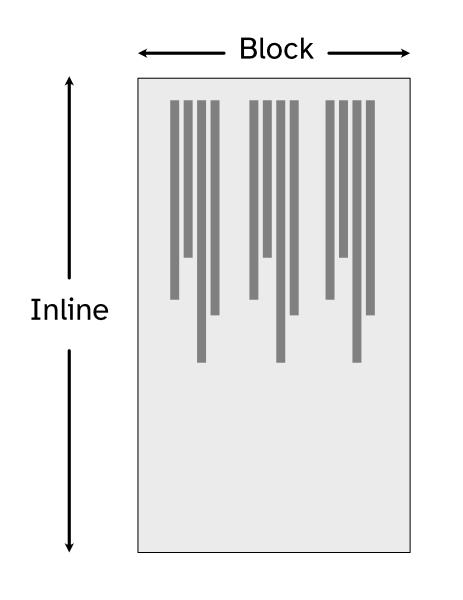
Instead of top, right, bottom, left, you now write block-start, block-end, inline-start, inline-end and your layout can automatically adjust for languages written right-to-left (like Arabic) or vertically (like Japanese).
Example
.box {
  padding-inline: 1rem;
  margin-block: 2rem;
  border-inline-start: 2px solid crimson;
}
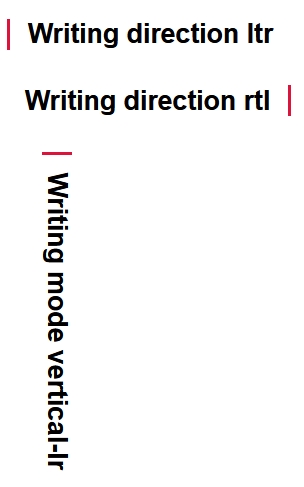
This will apply horizontal padding, vertical margin, and a border on the start side of the inline direction, whether that’s left or right depends on the language and writing mode. If we change the writing mode to vertical, the code will work correctly too.

Comments