 Community Magazine
Case Study: Building a Multilingual AI Content Factory with Joomla & n8n

In the world of digital content, consistency is everything. If you are a video creator, you know the struggle: you spend days scripting, filming, and editing a video. But once you hit "Upload" on YouTube, your job isn't finished. You still need to distribute that content.
Ideally, every video should become a blog post. That blog post helps your SEO, drives traffic to your website, and reaches people who prefer reading over watching. But writing a high-quality article that matches your video, formatting it, optimizing images, and publishing it takes hours.
Now, imagine doing that in two languages.
I recently launched a new project called "Ghawas" (The Diver in Arabic language). It consists of a YouTube channel, a companion Joomla website and a few social media accounts. My goal was ambitious: for every video I publish, I wanted a corresponding article on the website in both English and Arabic, perfectly formatted and linked together for multilingual SEO, then to distribute it to social media platforms.
Doing this manually was unsustainable. I needed a system that worked for me, not the other way around. I needed a "Content Factory."
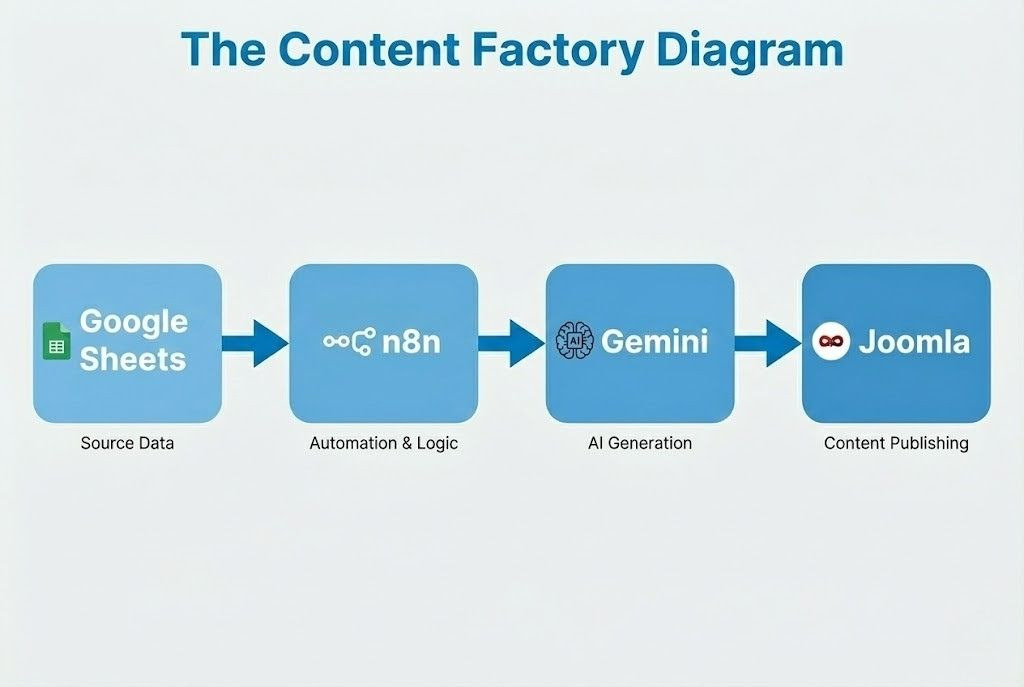
This is the story of how I built a fully automated AI publishing workflow using Joomla and n8n, and how I had to build a custom open-source tool to make it happen.
The Problem: The "Integration Gap"
When I started designing my workflow, I chose n8n as my automation engine. Unlike Zapier or Make, n8n is self-hosted. This means I can run it on my own server without paying monthly fees for every task execution. It gives me full control over my data and costs.
I had all the pieces ready:
- Source: Google Sheets (to trigger the process).
- Intelligence: Google Gemini 2.5 Pro (The free tier is enough to write the content).
- Destination: Joomla 5 (my CMS).
Connecting Google Sheets and Gemini was easy; n8n has built-in nodes for them. But when I tried to connect to Joomla, I hit a wall.
There was no dedicated "Joomla" node in the n8n community library that suited my needs.
I was left with the generic "HTTP Request" node. While Joomla 4 and 5 have an excellent Web Services API, interacting with it via raw HTTP requests in an automation workflow is painful. For every single action—whether creating an article, uploading an image, or updating a category—I had to:
- Manually construct the JSON payload.
- Handle the authentication headers (Bearer tokens) repeatedly.
- Parse the complex JSON responses to find the IDs I needed.
It was messy, prone to errors, and difficult to maintain. If I wanted to update the workflow later, I would have to dig through raw API code. I realized that if I wanted a stable, scalable "Content Factory," I needed a better tool.
The Solution: Building n8n-nodes-joomreem-content
I decided to stop building the workflow and start building a tool. I spent a few days developing and testing a custom n8n node specifically for Joomla.
My goal was to create a "No-Code" interface for the Joomla API. I wanted to be able to select "Create Article" from a dropdown menu, fill in the "Title" and "Text" fields, and let the node handle the heavy lifting (API calls, JSON formatting, and error handling) in the background.
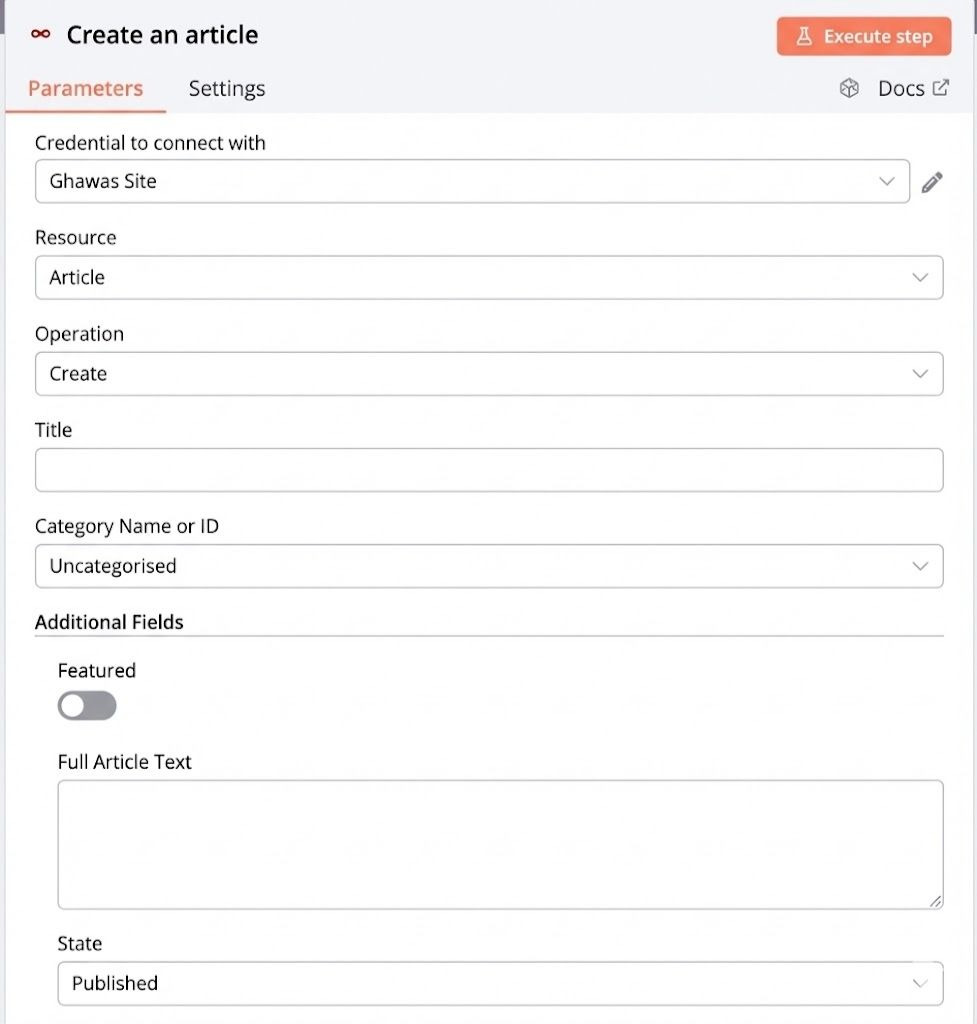
The result is n8n-nodes-joomreem-content, an open-source package I published on npm.
Currently, the node allows you to manage the core content structure of a Joomla site:
- Articles: You can Create, Update, Delete, and Get articles.
- Categories: You can manage your category structure dynamically.
- Tags: It fully supports tagging, which is essential for organizing content on large sites.
- Media: It handles the complex binary upload process, allowing you to push images directly to the Joomla Media Manager.
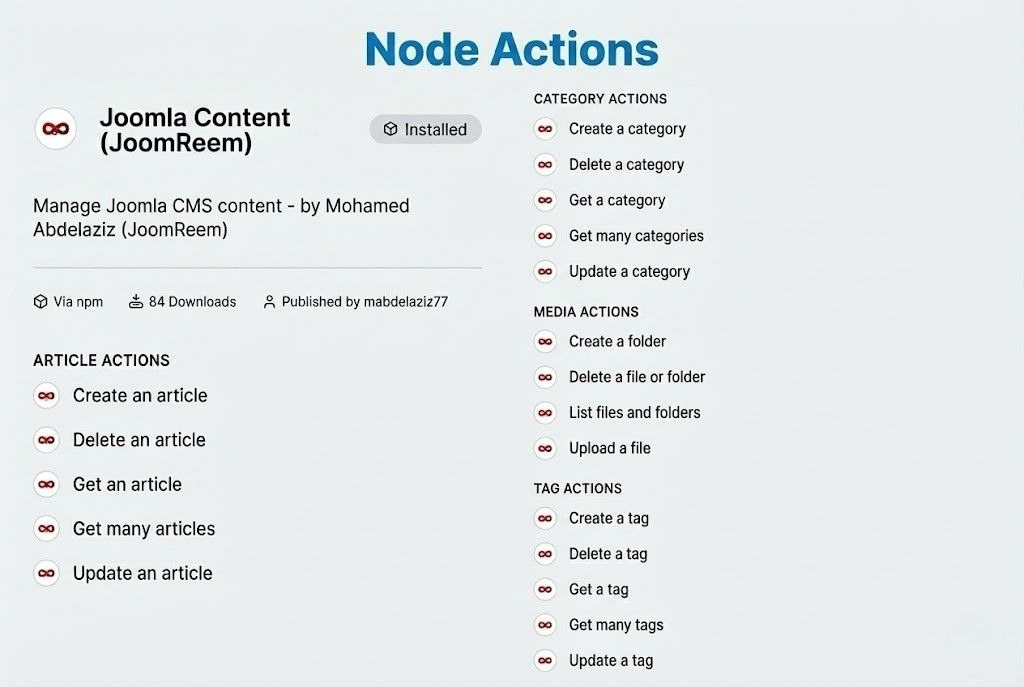
With this custom node ready, the complex API logic was replaced by simple, drag-and-drop blocks. I was finally ready to build the factory.
Inside the Workflow: How "Ghawas" Automation Works
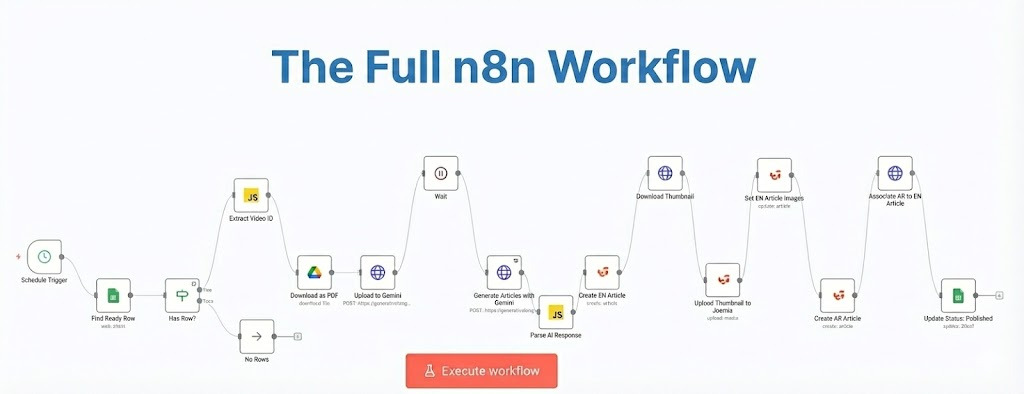
The workflow I built is designed to be "Human-Assisted AI." I don't let the AI decide everything; I guide it. Here is the step-by-step process that runs every time I publish a video.
Step 1: The Trigger (Google Sheets)
I use a Google Sheet as my production dashboard. When a video is ready, I add a new row with the video details.
Crucially, this is where I maintain editorial control. I don't want the AI to guess where the article belongs. In the spreadsheet, I manually input the Category IDs for the target article—one for the English version and one for the Arabic version.
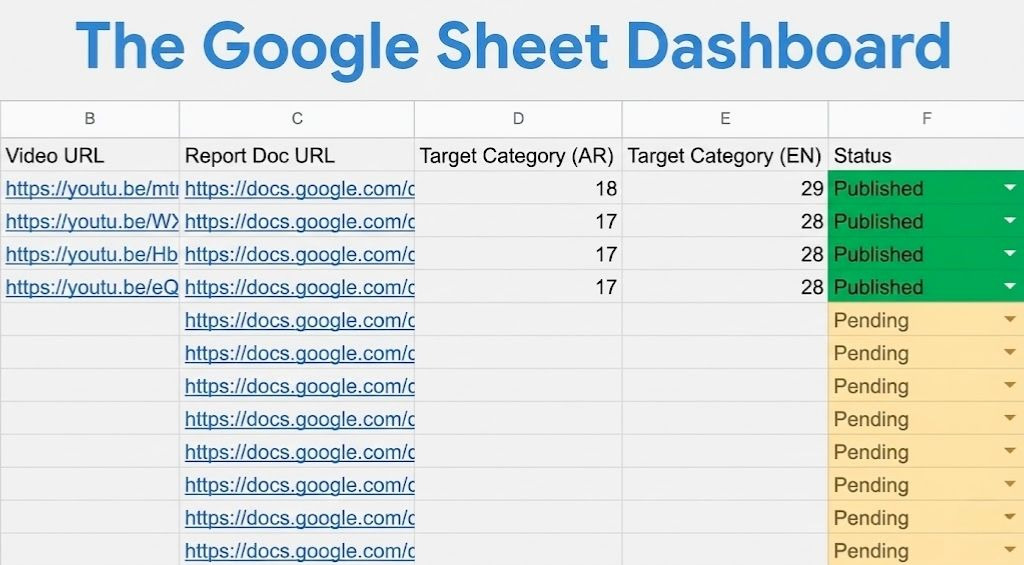
Once I set the status of the row to "Ready to Publish", n8n is scheduled to look for the first “Ready to Publish” record every specified number of hours.
Step 2: The Logic and Context
The workflow first downloads the video information. It extracts the video ID and downloads the high-resolution thumbnail.
Then, it prepares the data for the AI. This is a critical step. An AI model is only as good as the context you give it. I pass the video title, a google doc url with the original content and sources of the video, and my specific editorial guidelines to the next stage.
Step 3: The Writer (Gemini AI)
I use Google Gemini to generate the content. I spent a lot of time refining the prompt to ensure the output matches the "Ghawas" brand voice.
I ask Gemini to act as an expert content writer and generate a JSON object containing:
- English Title & Content: Formatted with HTML headers, lists, and a professional tone.
- Arabic Title & Content: A culturally accurate translation, not just a literal one.
- SEO Metadata: Meta descriptions and keywords for both languages.
- Image Alt Text: Descriptive text for the images in both languages.
By asking for a structured JSON output, I ensure that n8n can easily separate the English content from the Arabic content later in the flow.
Step 4: The Visuals
A blog post without images is boring. My custom node's Media resource comes into play here.
The workflow takes the YouTube thumbnail downloaded in Step 2 and uploads it directly to my Joomla server's images/articles/ directory (configurable in the node). It automatically renames the file to match the article alias for better SEO.
Step 5: Publishing to Joomla
This is where the magic happens. The workflow splits into parallel paths using my custom node:
- Path A (English): Creates the English article using the content from Gemini and assigns it to the English Category ID I defined in the Google Sheet. It also assigns the uploaded image as the "Intro" and "Full Article" image.
- Path B (Arabic): Creates the Arabic article with the corresponding Arabic content and Category ID.
Finally, the workflow performs a sophisticated "Update" operation. It takes the ID of the new Arabic article and the ID of the new English article and links them using Joomla's Associations feature.
This is a game-changer for multilingual sites. It tells search engines like Google that these two pages are translations of each other. When a user switches languages on the "Ghawas" website, they are taken to the exact same article in the other language, not the homepage. Doing this manually for every post used to be a tedious, error-prone task. Now, it happens instantly.
The Results
The impact of this automation on my project has been transformative.
- Speed: What used to take me 3 to 4 hours of writing, translating, formatting, and linking now takes approximately 5 minutes of processing time.
- Consistency: Every article follows the exact same HTML structure. I never forget to add a Meta Description or an Alt Tag anymore, because the system requires it.
- SEO Growth: Because the site is updated frequently with high-quality, structured content, the "Ghawas" domain authority is growing faster than I expected.
Future Roadmap
This project is just the beginning. The current version of n8n-nodes-joomreem-content handles the basics, but I have big plans for the future.
I am not planning to stuff every feature into one node. Instead, I plan to develop a suite of specialized nodes to manage different aspects of the Joomla ecosystem:
- User Management: I plan to build a new set of nodes to automate user registration, group assignment, and blocking/unblocking users. This could be useful for membership sites.
- Triggers: Currently, the node is "Action-based" (it does things). I am researching how to add Webhooks and Triggers, so n8n can listen to Joomla events (e.g., "On User Registration" or "On Article Update") and trigger workflows in response.
Conclusion
Automation is not about replacing the creator; it is about freeing the creator. By removing the repetitive tasks of formatting, uploading, and linking, I have more time to focus on what matters: researching and creating the videos that my audience loves.
Joomla is a powerful platform, and by connecting it to the modern ecosystem of AI and automation tools via n8n, we unlock capabilities that were previously impossible.
If you are running a Joomla site and want to try automating your workflow, I invite you to try the n8n-nodes-joomreem-content package. It is open-source, free, and available on npm. I would love to see what you build with it.
Some articles published on the Joomla Community Magazine represent the personal opinion or experience of the Author on the specific topic and might not be aligned to the official position of the Joomla Project
About the author

By accepting you will be accessing a service provided by a third-party external to https://magazine.joomla.org/
Comments 1
I have been searching trying to find a solution that can auto publish and associate multi lingual content. I also am creating the same category structure for each language and associating them. An enhancement that seems logical to me would be to allow us to only put in the Category ID of the page in the language that the article is being submitted in. Then have the articles placed into the same associated categories in all the other languages. Either way, I would like to communicate with you about how I might be able to do this. I am not actually a programmer. How can I get in touch with you?