 Community Magazine
Joomla is well known for its flexibility. Its menu system is powerful, its module architecture solid, and in the hands of experienced developers it can scale from simple websites to complex platforms. But anyone who has worked extensively with multi-level menus and multiple modules has likely run into a recurring frustration: the lack of module inheritance.
Joomla allows modules to be assigned to specific menu items, giving precise control over what appears on each page. That level of control is a strength, but as a site grows, it can also become a maintenance burden.
A Common Scenario
Imagine a site with a two-level menu structure. At the top level is People, with sub-items for Faculty, Staff, and Administration. When a visitor views any of these pages, the left sidebar displays two modules:
-
A Contact Us module
-
A menu module showing the People navigation
Navigation is clear and consistent.
Now the client asks to add Graduate Students under People. You create the menu item, link it to an article, and test the page. The content loads, but the sidebar is gone. No contact module. No submenu navigation.
Nothing is broken. The issue is simple: the new menu item was not manually assigned to those modules. If you’ve built Joomla sites long enough, you’ve seen this happen.
The Cost of Manual Assignment
Fixing the issue is straightforward: open the Module Manager, find each relevant module, and check the new menu item. But real-world sites are rarely this simple.
What if a page has multiple modules? What if different sections use different logos or banners? Adding a single menu item can turn into checking, and rechecking, many module assignments. Something inevitably gets missed, and clients notice when pages look incomplete or inconsistent.
This is the problem inheritance is designed to solve.
What Module Inheritance Means
Module Inheritance is a feature that is currently being worked on for Joomla 6.2.
Inheritance is a familiar concept in software development: child elements inherit behavior from their parent unless explicitly overridden. Applied to Joomla modules, it means this:
If a module is assigned to a parent menu item, it can automatically appear on sub-menu items below it.
Using the earlier example, if the Contact Us and People menu modules are assigned to the People menu item, then Faculty, Staff, Administration, and any future items, like Graduate Students, can inherit those assignments automatically.
No extra steps. No missing modules.
Inheritance Is Optional
Module inheritance is not mandatory. It is an option that can be enabled per module during menu assignment.
If a module should only appear on a single page, it can still be explicitly assigned as it is today. Inheritance only applies when a developer intentionally chooses to use it. This preserves Joomla’s flexibility while reducing unnecessary manual work.
How Inheritance Works
When assigning a module, you can choose one of the following options:
Inherit (One Level)
The module is assigned to the selected menu item and automatically applied to its direct child menu items, one level deep. This includes both existing items and any added later.
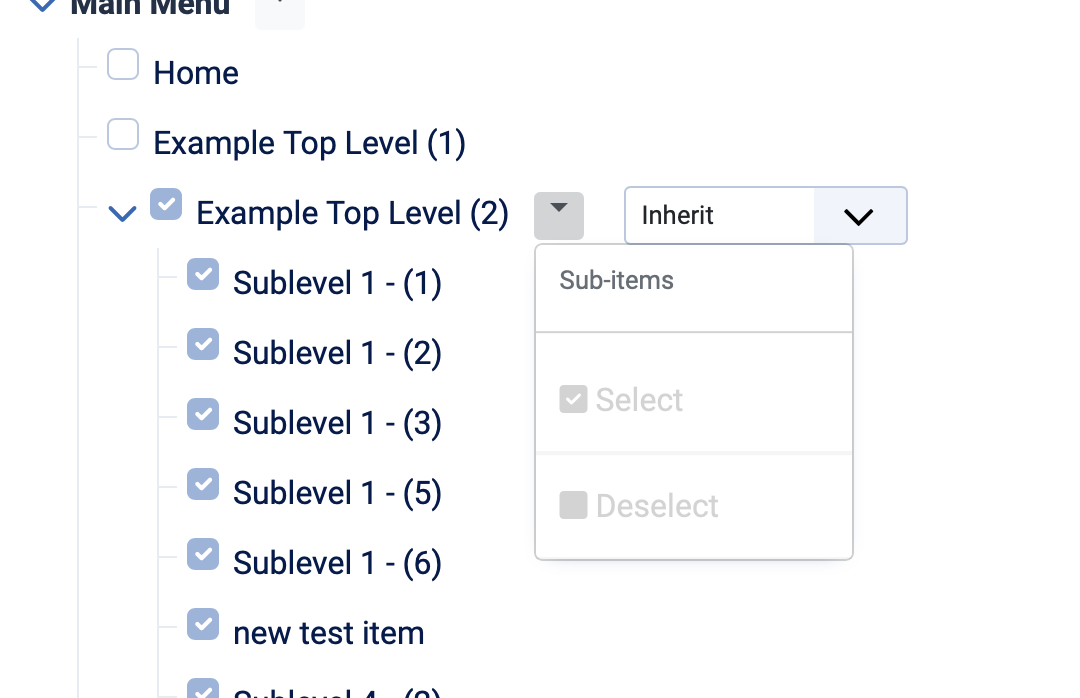
Inherit All
The module is applied to all descendant menu items, regardless of depth. This is ideal for navigation, sidebars, or branding elements that should appear consistently throughout an entire section.
Inheritance is applied dynamically. If a menu item is added, moved to a new parent, or moved to a different menu, Joomla reevaluates inheritance and updates module assignments automatically, no manual cleanup required.
When it is applied
Module inheritance is applied when a module or menu item is saved, not at page render time. Because the inheritance logic is resolved during configuration changes, it does not add any overhead to page display. The database queries used to render modules on the front end remain unchanged, ensuring there is no impact on website performance.
Benefits at a Glance
-
Prevents modules from disappearing on new submenu items
-
Reduces repetitive manual assignments
-
Improves consistency in layout, navigation, and branding
-
Simplifies site maintenance as menus grow
-
Speeds up ongoing development and updates
In short, module inheritance removes a common pain point for Joomla developers without sacrificing control.
Moving Joomla Forward
Joomla has always emphasized flexibility and choice. Module inheritance builds on that foundation by aligning module behavior with menu hierarchy, something developers already expect intuitively.
Menus already have structure. Content already follows hierarchy. Allowing modules to do the same is a natural and practical step forward.
The proposed implementation can be reviewed in the official Joomla repository:
Pull Request
https://github.com/joomla/joomla-cms/pull/47570
We welcome your input in making this feature even more helpful to the Joomla community.

Comments