 Community Magazine
If you follow my writings, you probably know that I try to use as few extensions as possible. Not because I don’t like extensions, but because I like to keep the websites I create as easy to maintain as possible. There are many cases where extensions absolutely make sense: events calendars, big image galleries, file downloads, etc. In other cases I’m sure I can handle the request with Joomla core and some overrides, because Joomla is a very powerful system.
Working on new sites lately I came across the request to display modules in some pages, but not in others. As we know, modules on a Joomla website are attached to menu items. If you are using a category blog to display your articles, Joomla takes care of the subsequent url structure. That means you don’t need to create a menu item for each article, it happens automagically. That is of course a great thing: you add a new article in the category and it will be displayed with a correct search machine friendly (SEF) url. The downside is that you can’t display a module in the category blog view and hide it in the single article view or vice versa.
There are of course third-party solutions for the “problem” and it is up to you to decide if it is worth installing them. In this short tutorial I want to show you how to modify your modules so that they can be displayed only in the category blog view or in the article view only.
The Cake Factory
I have created a demo website for a cake store. The main page is a category blog showing all nice cakes. At the top we have an intro text written in the category description. At the bottom we have a custom module with a text about the ingredients.
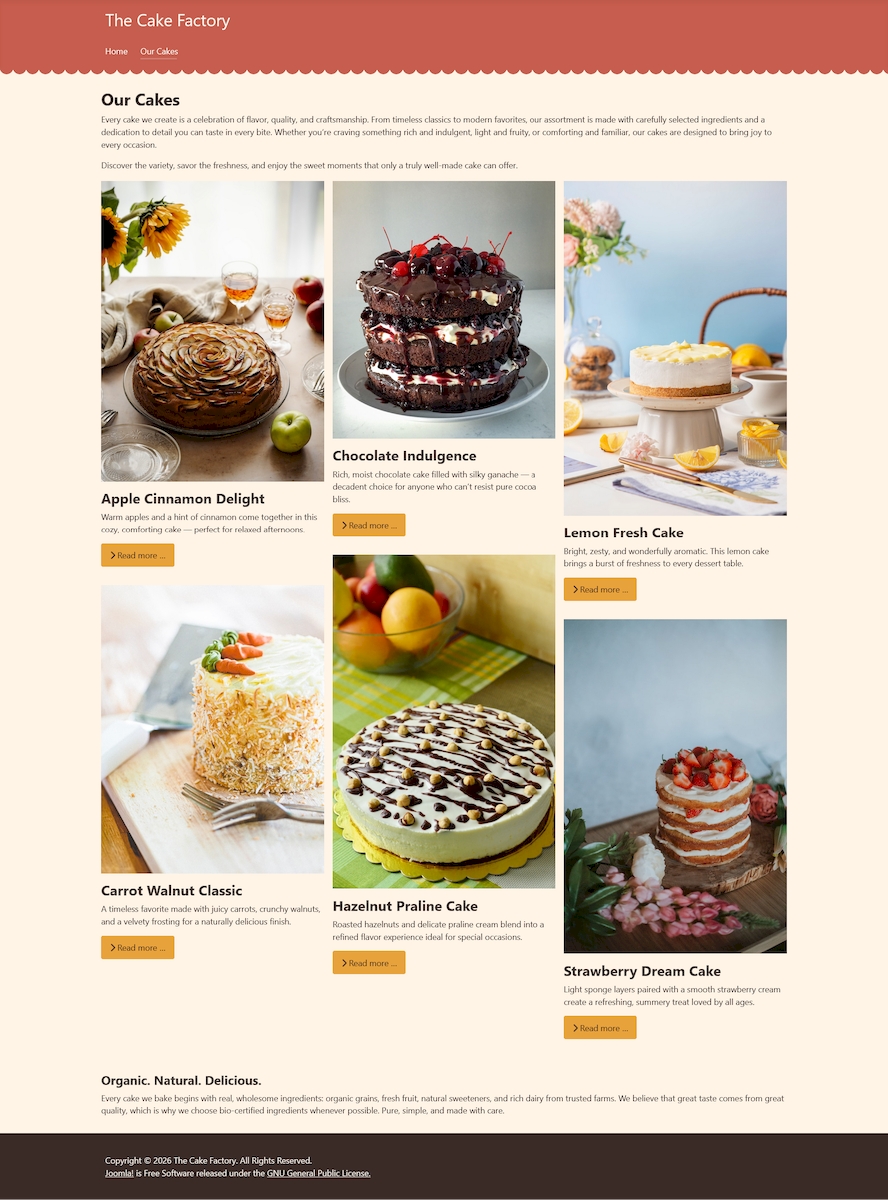
When we click on a cake we get the single article view which is part of the same menu item “Our Cakes”, that means the module “Organic. Natural. Delicious.” will be displayed there too. But we don’t want that.
On the other side we want to display an articles module “You may also like” with four cakes under the single articles:
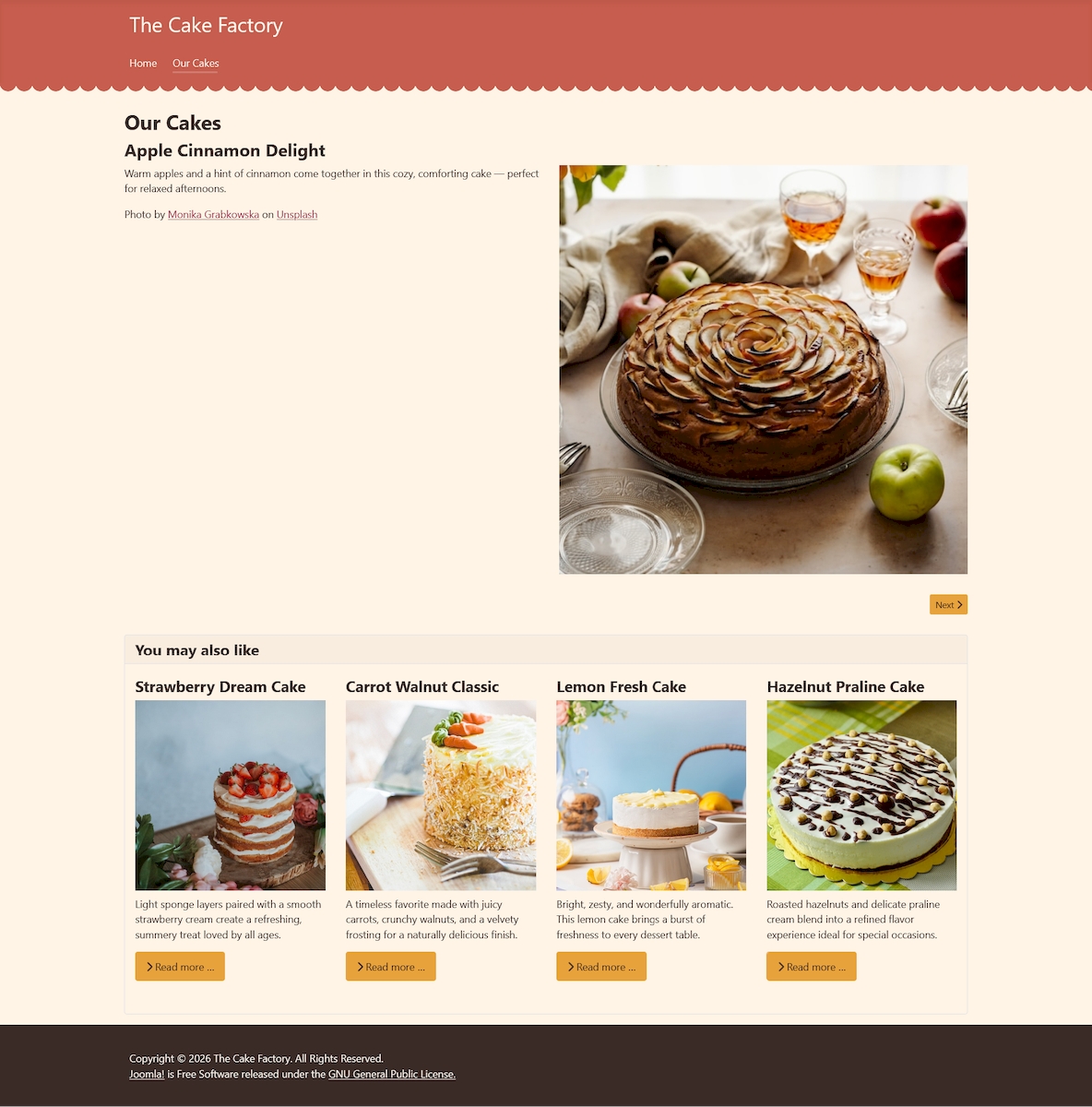
The module “You may also like” is also attached to the menu item “Our Cakes” so it will also be displayed under the category blog. And as you can imagine, we don't want that.
How to solve the problem? Do we really need a big extension to manage the display of two modules? I don’t think so.
URL structure and overrides
To understand how the override of the modules will work, we first need to understand how Joomla creates the URL for a page. To demonstrate it, I have disabled the SEF URLs in the global configuration. The URL of the menu item “Our Cakes” looks like this:
http://dev6.test/index.php?option=com_content&view=category&layout=blog&id=8&Itemid=102http://dev6.test: the domain name (in this case a local domain)
index.php: is the starting point of each page
option=com_content: the menu item display articles and they belong to the content component (com_content)
view=category&layout=blog: we have selected Category Blog as menu item type
id=8: is the category ID
Itemid=102: is the menu item ID
If we look at the URL of a single cake, it is formed like this:
http://dev6.test/index.php?option=com_content&view=article&id=5:apple-cinnamon-delight&catid=8&Itemid=102The first parts are the same as above.
view=article: now we are displaying an article
id=5:apple-cinnamon-delight: the combination of article ID and article alias
The last two parameters are again the same as above. Here you can recognize that the articles belong to the same menu item.
With activated SEF URLs and URL Rewriting we will have http://dev6.test/our-cakes and http://dev6.test/our-cakes/apple-cinnamon-delight
What can we now do with all this information?
We will create one override for the articles module and one for the custom module.
The articles module should be displayed in the article view, but not in the category view. With $app->input->get('view') we can “ask” which view is active. Using the information in an if-statement we can “tell” the module to render or not:
// Display only in article view
$app = Factory::getApplication();
if ($app->input->get('view') !== 'article') {
    return;
}
In this case, we tell the module not to render if the view is not “article”.
Here is the complete code of the override (default.php):
<?php

/**
 * @package     Joomla.Site
 * @subpackage  mod_articles
 *
 * @copyright   (C) 2024 Open Source Matters, Inc. <https://www.joomla.org>
 * @license     GNU General Public License version 2 or later; see LICENSE.txt
 */

defined('_JEXEC') or die;

use Joomla\CMS\Factory;
use Joomla\CMS\Helper\ModuleHelper;
use Joomla\CMS\Language\Text;

/** @var Joomla\CMS\WebAsset\WebAssetManager $wa */
$wa = $app->getDocument()->getWebAssetManager();
$wa->registerAndUseStyle('mod_articles', 'mod_articles/mod-articles.css');

if (!$list) {
    return;
}

$groupHeading = 'h4';

if ((bool) $module->showtitle) {
    $modTitle = $params->get('header_tag');

    if ($modTitle == 'h1') {
        $groupHeading = 'h2';
    } elseif ($modTitle == 'h2') {
        $groupHeading = 'h3';
    }
}

$layoutSuffix = $params->get('title_only', 0) ? '_titles' : '_items';

// Display only in article view
$app = Factory::getApplication();
if ($app->input->get('view') !== 'article') {
    return;
}

?>
<?php if ($grouped) : ?>
    <?php foreach ($list as $groupName => $items) : ?>
        <div class="mod-articles-group">
            <<?php echo $groupHeading; ?>><?php echo Text::_($groupName); ?></<?php echo $groupHeading; ?>>
            <?php require ModuleHelper::getLayoutPath('mod_articles', $params->get('layout', 'default') . $layoutSuffix); ?>
        </div>
    <?php endforeach; ?>
<?php else : ?>
    <?php $items = $list; ?>
    <?php require ModuleHelper::getLayoutPath('mod_articles', $params->get('layout', 'default') . $layoutSuffix); ?>
<?php endif;
For the custom module we check if the view is “category”:
// Display only in category view
$app = Factory::getApplication();
if ($app->input->get('view') !== 'category') {
    return;
}
Full override:
<?php

/**
 * @package     Joomla.Site
 * @subpackage  mod_custom
 *
 * @copyright   (C) 2009 Open Source Matters, Inc. <https://www.joomla.org>
 * @license     GNU General Public License version 2 or later; see LICENSE.txt
 */

defined('_JEXEC') or die;

use Joomla\CMS\Factory;
use Joomla\CMS\HTML\HTMLHelper;
use Joomla\CMS\Uri\Uri;

$modId = 'mod-custom' . $module->id;

if ($params->get('backgroundimage')) {
    /** @var Joomla\CMS\WebAsset\WebAssetManager $wa */
    $wa = Factory::getApplication()->getDocument()->getWebAssetManager();
    $wa->addInlineStyle('
#' . $modId . '{background-image: url("' . Uri::root(true) . '/' . HTMLHelper::_('cleanImageURL', $params->get('backgroundimage'))->url . '");}
', ['name' => $modId]);
}

// Display only in category view
$app = Factory::getApplication();
if ($app->input->get('view') !== 'category') {
    return;
}

?>

<div id="<?php echo $modId; ?>" class="mod-custom custom">
    <?php echo $module->content; ?>
</div>
That’s all folks!
Conclusion
If you have simple requests like in this example, managing the display of the modules with a few overrides can be perfectly ok. If you have a website with tons of modules and menu items using an extension will also be perfectly ok.

Comments