 Community Magazine
With Joomla 6.1, a small but powerful enhancement was added to the TinyMCE editor: dedicated buttons for inserting, editing and removing the HTML <abbr> element.
This new feature makes it easy for authors to properly mark up abbreviations and acronyms without touching HTML code. It’s a small change that can make a big difference to clarity, accessibility and professionalism.
What Is the <abbr> Element?
The HTML <abbr> element is used to represent an abbreviation or acronym. It allows you to provide the full expansion of a shortened term using the title attribute.
For example:
<abbr title="World Wide Web">WWW</abbr>
In most browsers, users can hover over the abbreviation and see the full meaning in a tooltip. More importantly, assistive technologies such as screen readers can access that expanded form, helping users better understand your content.
This is semantic HTML — it adds meaning, not just styling.
Why Using <abbr> Improves Accessibility
Accessibility is about making content understandable to everyone. Abbreviations can create unnecessary barriers if their meaning is unclear.
Clarity for All Readers
Not everyone knows what “WCAG”, “HTML” or “CSS” stand for. Providing the expansion ensures no one is left guessing.
Better Screen Reader Support
When marked up correctly, assistive technologies can announce the full meaning instead of reading out individual letters.
Improved Semantic Structure
Using proper HTML elements communicates meaning to browsers, search engines and accessibility tools.
In short: this tiny button helps make your content more inclusive.
How to Use the New Abbr Buttons in TinyMCE
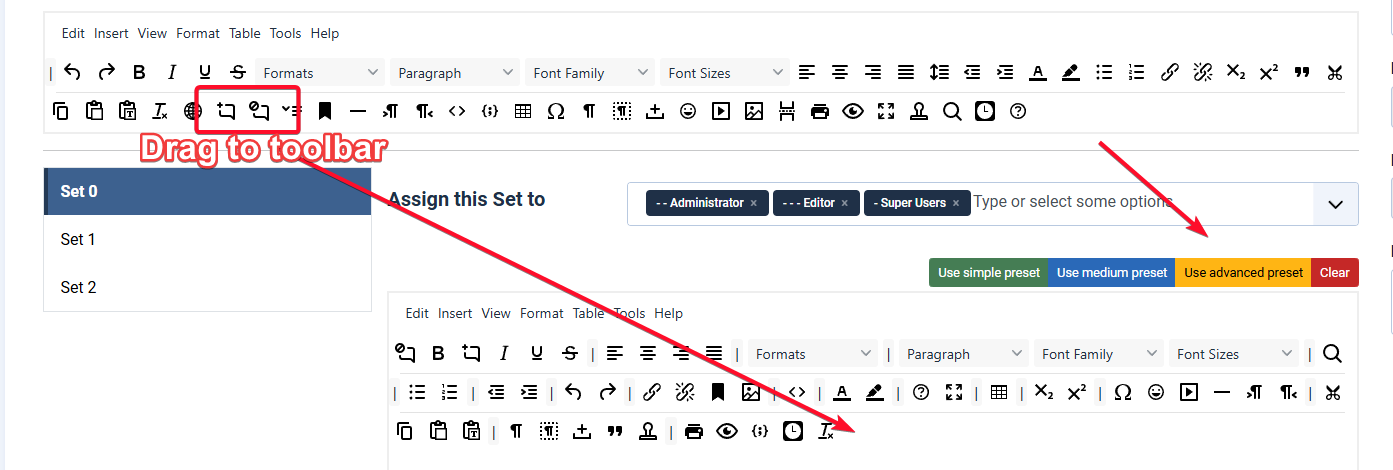
If you are using a clean install of Joomla 6.1 then the new abbr buttons are already on your TinyMCE toolbar. If you have upgraded to Joomla 6.1 then you will need to add them in the TinyMCE plugin editor by either dragging the two new icons to your toolbar or by using the Advanced Preset.
Step 1: Select the Abbreviation
Open your article in the Joomla editor and highlight the abbreviation you want to mark up.

Step 2: Click the Insert/Edit Abbreviation Button
Click the new Abbreviation icon in the TinyMCE toolbar.
Step 3: Enter the Full Meaning
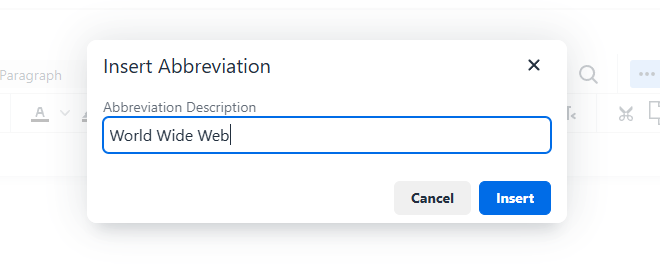
A dialog box will appear. Enter the full expansion of the abbreviation in the provided field.
Step 4: Review the Generated Markup (Optional)
If you switch to code view, you will see TinyMCE has generated clean semantic markup:
<abbr title="World Wide Web">WWW</abbr>

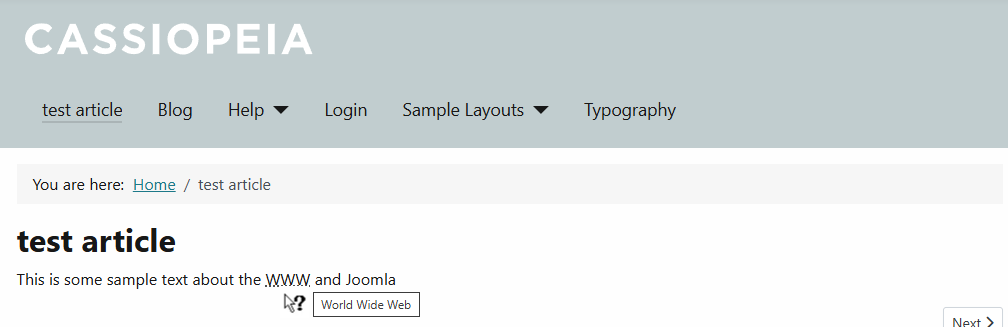
And if you check the article on your site you will see some basic styling, the cursor change to a help pointer and the full meaning of the abbreviation in a title popup.
Removing an Abbreviation
To remove the markup, select the abbreviation and click the Remove Abbreviation button. The text will remain, but the semantic markup will be removed.
Real-World Examples
Technical Documentation
The DOM allows JavaScript to interact with web pages.
Accessibility Statements
Our site conforms to WCAG 2.2.
Server Technologies
Joomla runs on PHP.
General Web Terms
The W3C develops web standards.
In each case, the abbreviation remains clean and readable while still providing additional context.
Best Practices
- Use
<abbr>the first time an abbreviation appears in your content. - Always provide a meaningful expansion in the
titleattribute. - Do not use it purely for tooltips — it should represent a genuine abbreviation.
- Keep your writing natural. The markup enhances clarity without adding clutter.
Final Thoughts
The new Abbreviation buttons in Joomla 6.1 are a perfect example of how small editorial tools can have a meaningful impact.
They encourage better semantic HTML, improve accessibility, and help ensure your content is understandable to the widest possible audience.
Sometimes accessibility improvements are complex. This one is just a click away.
Start using it in your next article and help make the web clearer for everyone.
Read the Italian translation here: https://www.joomlaitalia.it/guide-e-tutorial/traduzioni-joomla-magazine/nuovi-pulsanti-di-abbreviazione-abbr-in-tinymce

Comments