 Community Magazine
It is not the first time we write about how to make the Joomla backend a nice place to work — for yourself and for your customers. In this article we collect and refresh practical tips and tricks, ordered from the simplest tweaks to the more complex backend menu changes.
Joomla ships with a responsive, accessible backend template called Atum. Like any Joomla template it can be customised through parameters, a user.css, overrides, modules, and child templates. Almost everything you can do in the frontend, you can do in the backend too.
Don’t forget: Atum is built to conform to WCAG 2.1 AA. Whatever you change, make sure you keep the template accessible for all users.
Starters
In this section we present tips for changes which you can do without any coding.
Everything in this section is done entirely through Joomla settings, in template parameters an in the administrator interface.
1) Your Client’s Identity
If you are building a site for a customer, brand the backend with their corporate colours and logo. A familiar visual environment builds trust and reduces the “where am I?” effect. See the example in this Article Making Joomla Backend Bespoke For Clients
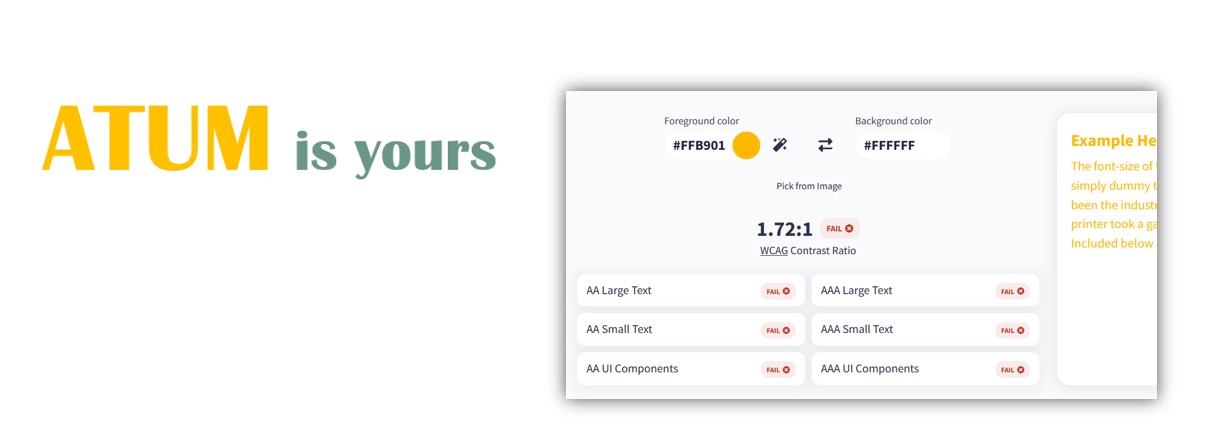
Accessibility: If the corporate colour is a bright or saturated hue (orange, yellow, lime), always verify text contrast. A good contrast ratio is at least 4.5:1 for normal text.
This for example is bad contrast and you cannot use the yellow, at least not for the light version, while it works in dark mode. In this case, you can choose a darker colour in the settings.
2) Login Page
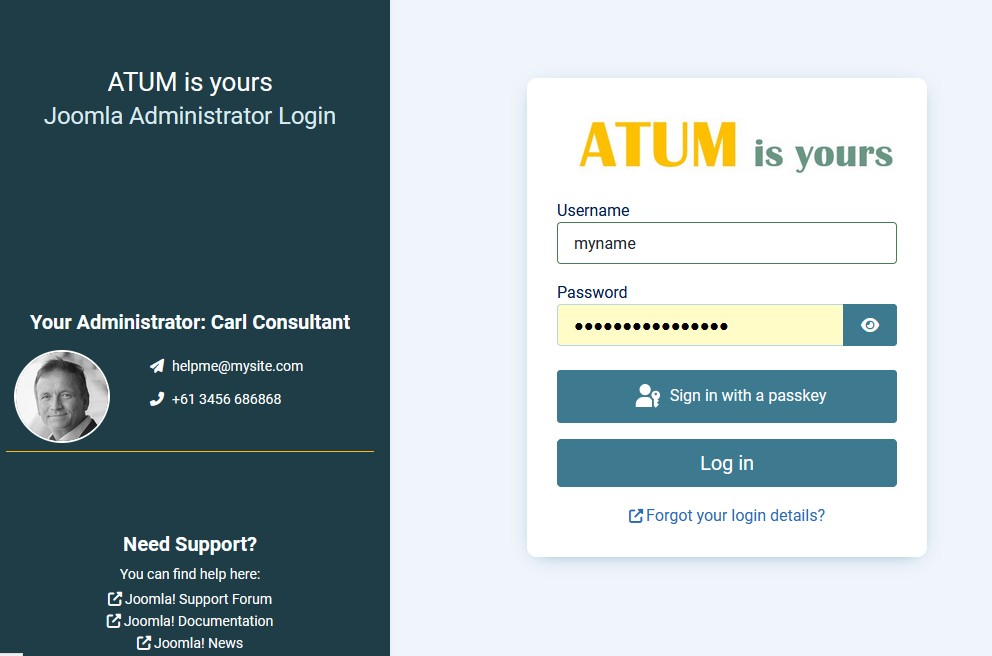
First impressions count. The backend login page is the first thing a customer sees. The login form occupies the right side but the left sidebar is yours to use as an information panel.
Use it for custom modules.
Atum has a module (mod_loginsupport). Change the links so taht they are convenient for your customer.The links in this module are useful for developers or the site maintainer, but for editors these help informations could be “too tech”.
You can add contact details for the web agency or developer or a welcome message to this sidebar.
Also adapt the login support module. Assign your national forum address and, if you want, use a language override to change the title text.
3) The Customtop Bar
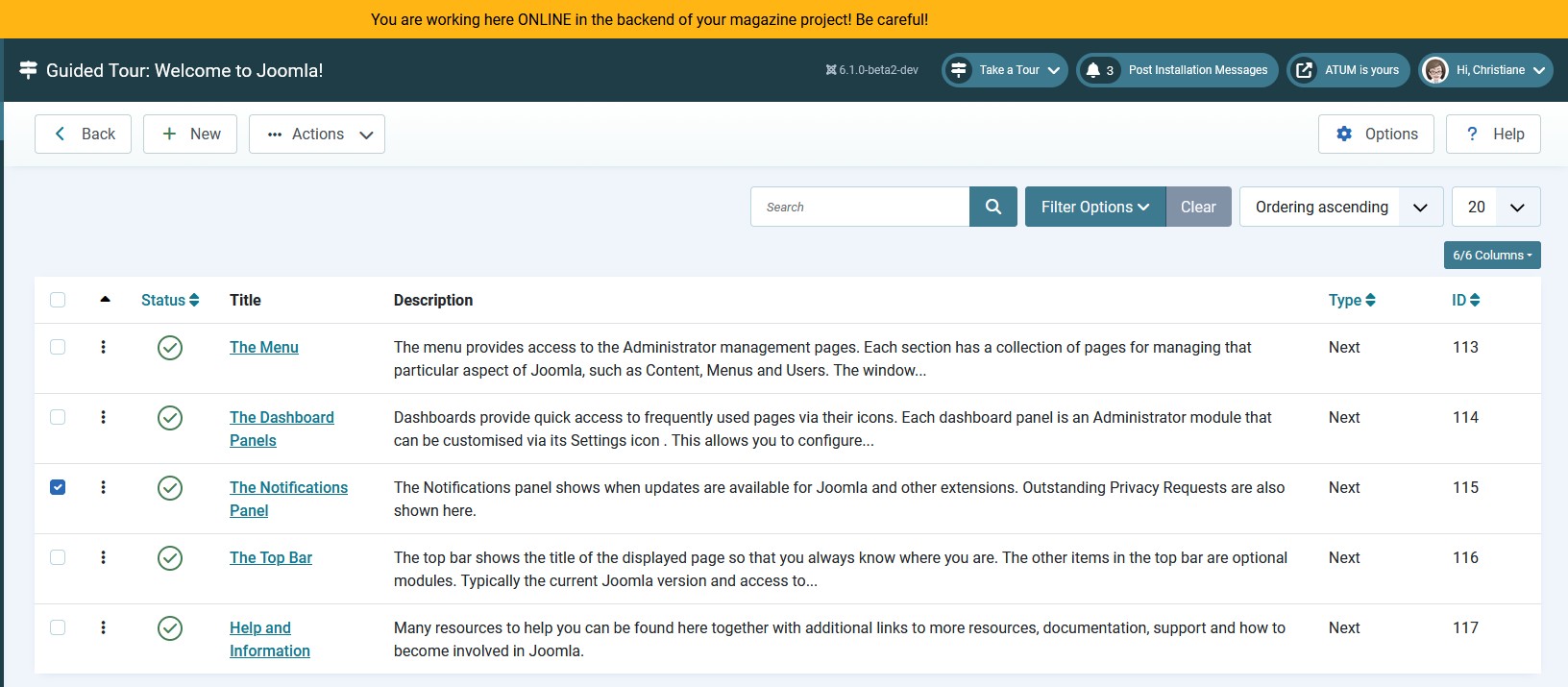
The customtop position in Atum goes across the full width of every backend page. You add a custom module, and even better: You can add such a module for users und usergroups using the Joomla ACL.
For the developer: A warning bar prevents accidental changes to the wrong site.

For maintainers: contact information for the agency or support team.

4) Clean Dashboard
The backend ships as a complete toolset. If you love DIY, you know that you only need a subset of the tools in a box and you will surely re-arrange them, with your favourite screwdriver on top and the combination spanner on the bottom.
Removing unused elements reduces cognitive load and helps clients find what they need faster.
- Unpublish unused Quick Icons or the complete quickocon module.
- Deactivate unused notification plugins
- Unpublish modules you don't need
- Re-order modules so the most-used tools appear at the top
- Use module chrome colours or borders to visually group sections, highlighting the groups, simply with the module class parameter, no CSS is necessary.
- Create a custom Quicklinks module for a focused set of buttons.

Soups and Salads
A bit more sophisticated and for perfectionists are these possibilities. They don't need coding but they need a plan. And please, if you find a bug in your salad or a hair in the soup - open an issue on github.
1) Speak the User’s Language
Joomla is translated into many languages, but the default translation may not match the register or dialect your users expect. Language overrides let you adapt any string in the interface without touching core files.
Use a more formal or more casual tone depending on the client’s culture, or use easy language.
Language overrides survive Joomla updates and are not version checked.
2) Adapt Guided Tours
Joomla’s Guided Tours feature walks new users through common tasks. If you have renamed menu items or reorganised the dashboard, update the tours to match. Tour steps are editable directly in the administrator.
You can adapt guided tours in System -> Guided Tours. In our case we have removed the notifiation Panel and so can remove this step from guided tours:
Small Plates
Until here we have already a lot of small changes which are easy to implement without coding or touching any core files. The next chapters need some know-how.
1) Customisation with Child Templates
Every user can have their own backend layout. By creating child templates and assigning them to individual users (or user groups), you can tailor the experience to each person’s needs.
Why would you do this? Accessibility is a good reason:
- Users with visual disabilities may need a special color palette due to a colour vision deficiency or extra large or small fonts.
- Sighted users can ignore distracting elements; screen-reader users cannot, and will be happy with a dedicated child template which removes unnecessary elements.
- Users with limited fine-motor control benefit from large buttons and generous padding, making click targets easier to hit.
- Power users who prefer to see as much as possible on one screen can have a compact template with smaller fonts and tighter padding.
How to set up:
Go to System → Site Templates, Atum. Generate a child template, adjust parameters.
For every child template you can generate an own user.css and own overrides.
You can assign these child templates to users (in user's basic settings) or for the whole site.
2) User Groups, Access Levels & Permissions
Every user gets only and exactly their own information with Joomla’s ACL (access control list). An example was the customtop Module above.
Before you do anything with Access Control List - user permissions, access levels or user groups - there is a big warning: Always make a Backup before you touch ACL.
No Backup - No Mercy
Mains
The techniques below require a little more effort. For many techniques, there are already tutorials in the magazine or in the web. If you wish to have more tutorials here, please let us know in the comments!
1) Template Overrides
Just as in the frontend, you can override any backend view or layout and also the menu presets.
There is an older article in the Magazine Joomla is yours and so is the backend template atum
It explains a nice override for an avatar in the backend user module.
 The procedure described in this article is still correct. The override of the layout file however demonstrates, how layouts can change over the time. The code snippet presented in the old article for overriding the layout is now slightly different from the one in the old article:
Here is the new one for Line 13 - 64 of mod_user default layout
use Joomla\CMS\Factory;
use Joomla\CMS\HTML\HTMLHelper;
use Joomla\CMS\Language\Text;
use Joomla\CMS\Router\Route;
use Joomla\CMS\Session\Session;
use Joomla\CMS\Uri\Uri;
use Joomla\Component\Fields\Administrator\Helper\FieldsHelper;

$hideLinks = $app->getInput()->getBool('hidemainmenu');

if ($hideLinks) {
    return;
}

$app        = Factory::getApplication();
$user       = $app->getIdentity();
$userfields = FieldsHelper::getFields('com_users.user', $user, false);

$fields = [];

foreach ($userfields as $field) {
    $fields[$field->id] = $field;
}

// The id of your avatar field
$fieldId = 8;

$url = !(empty($fields[$fieldId]->value)) ?  json_decode($fields[$fieldId]->value) : '';
$avatar = !empty($url->imagefile) ? HTMLHelper::_('cleanImageURL', $url->imagefile) : '';

// Load the Bootstrap Dropdown
HTMLHelper::_('bootstrap.dropdown', '.dropdown-toggle');
?>
<div class="header-item-content dropdown header-profile">
    <button class="dropdown-toggle d-flex align-items-center ps-0 py-0" data-bs-toggle="dropdown" type="button"
        title="<?php echo Text::_('MOD_USER_MENU'); ?>">
        <span class="header-item-icon">
            <?php if (!empty($avatar)) : ?>
                <?php echo HTMLHelper::_('image', $avatar->url, '', ['aria-hidden' => 'true']); ?>
            <?php else: ?>
                <span class="icon-user-circle" aria-hidden="true"></span>
            <?php endif; ?>
        </span>
        <span class="header-item-text">
            <?php echo Text::_('MOD_USER_MENU'); ?>
        </span>
        <span class="icon-angle-down" aria-hidden="true"></span>
    </button>
Please note: The backend changes more frequently between Joomla versions than the frontend. After every update, check the release notes and compare your override files against the originals. Outdated overrides are a common source of layout bugs.
2) Menu Presets
The administrator menu can be reorganised in different ways. The most simples are already mentioned above: Language overrides and deactivated components.
Module Settings allow a few changes: For users who prefer the Menu as it was in J3, an alternate Menu can be activated.
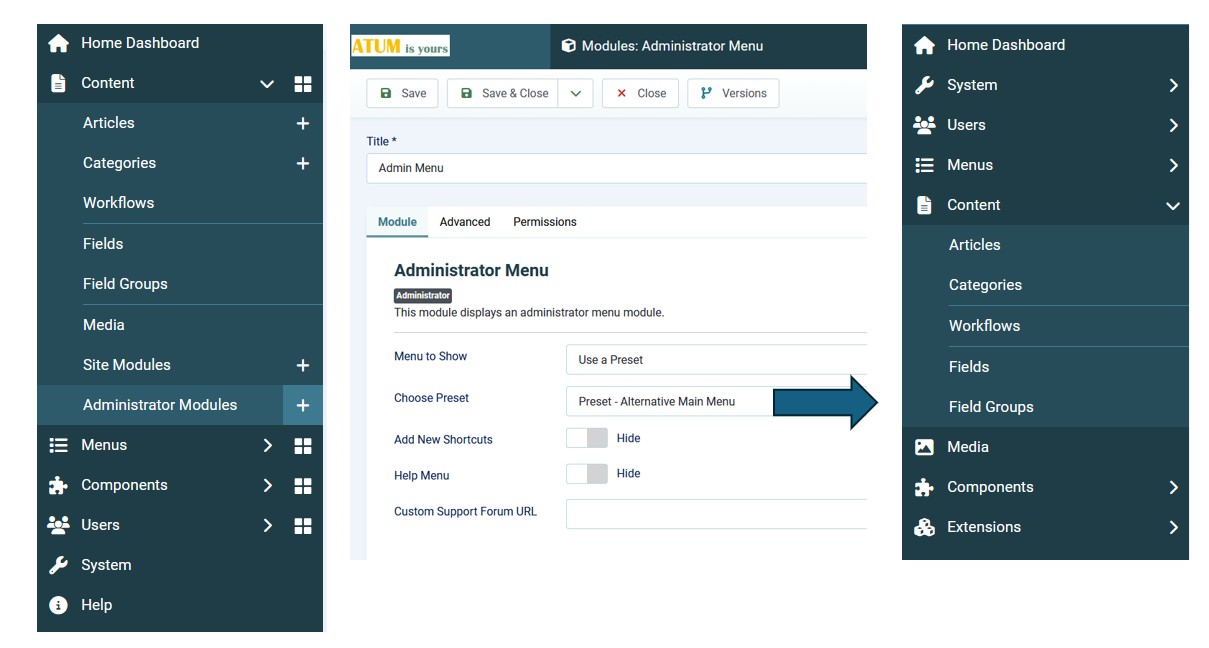
The main menu of the Joomla backend is generated via a preset file. This is performant. The preset files are hidden in the com_menus folder. They can have overrides, but these overrides have to be made manually, they are not part of the template override feature.
3) Your own menu module
At the end of this magazine article: Creating a Custom Admin Experience you find a tutorial how make an own main menu.
4) Chef's Special: Preset Override
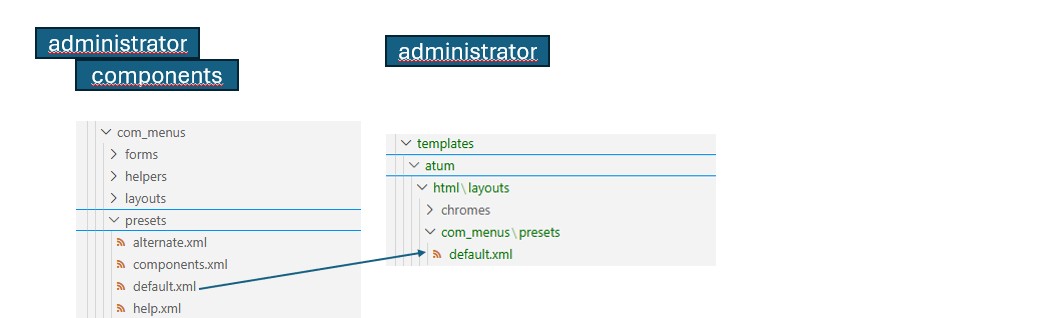
A simple way is working with preset overrides. Presets are not in the Override area of atum, the files have to be copied manually from administrator/com_modules to the template html folder:
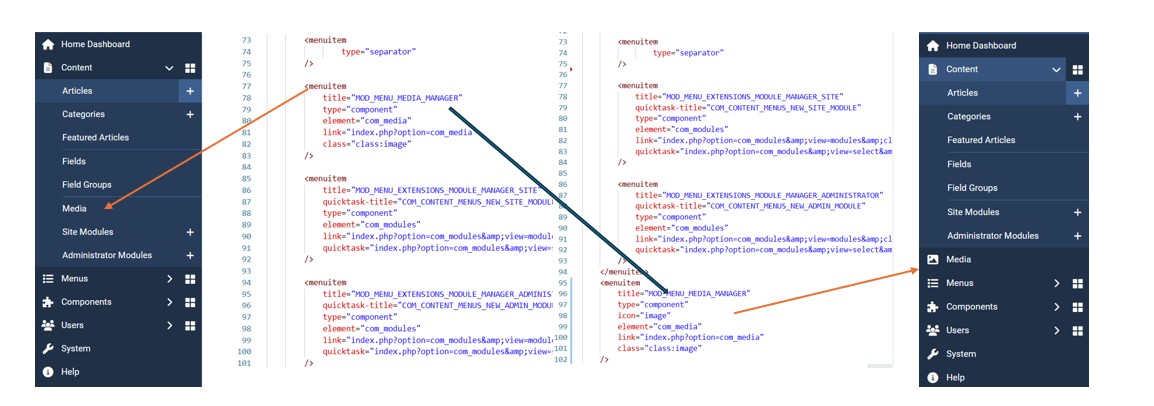
Now you can modify the preset. My favourite change is moving the meida button from Content to the first menu level, with a simple preset override.
Dessert
Are you really still hungry?
3rd Party Extensions
For more improvement, there are many extensions in the JED (Joomla Extension Directory).
Before installing any extension, try it, verify it is compatible with your Joomla version, is accessible and is actively maintained.
Digestif (is on the house)
At the time I wrote this, only God and I knew how it worked. Now, only God knows
Document every override, custom module, and language string you create. Write a changelog file for the maintainers, so future developers (including future you) know what was changed and why.
- Prefer language overrides and module parameters over template overrides wherever possible
- Test every customisation against a new Joomla version before deploying updates
- Avoid over-engineering: do what is helpful but avoid "BlingBling". The Backend of a Content Management System is a workshop, not a catwalk.
Enjoy your meal!
The Joomla backend is a toolset. From a five-minute colour change to a fully branded, role-adapted administration environment, the tools are all there. You do not need a single line of PHP to make a meaningful difference.
Start small: brand the login page, clean up the dashboard, and add a help module. Then build from there based on what your users actually need.
Have your own backend customisation tips? Share them in the comments. The community learns best from real projects.

Comments