 Community Magazine
The Joomla 4 Dashboard has a lot of options. Which is great, except when you see it for the first time. For people new to Joomla, it can be confusing to see all the things you can do. Where should you click to create new content? To upload an image? To do other things? If you build a website for people not used to working in the Joomla backend, you can make it a lot easier for them by customizing the Dashboard.
Florian Bauer did a presentation about this on the JoomlaDay DACH (Germany, Austria, Switzerland) and is more than happy to tell us how he changes the user experience completely.
Thanks for participating in this article! Could you tell us a little about yourself?
My name is Florian Bauer, I live and work in Vienna, Austria. In 2006 I started my first web project with Joomla 1.0.13 and began to love this CMS. In 2010 I started my company webfeuer.wien that focuses primarily on Joomla-based websites for small and medium-sized enterprises, as well as websites in the government sector.
I am active in the Joomla Facebook Groups and Glip Channel, I am in the JoomlaDay Austria and JoomlaDay DACH organization team and speaker at these events. I love to play guitar and spend time with my two sons.
Tell us how it all started. What made you decide to create custom dashboards, and a special custom dashboard module for your clients?
I noticed that a lot of inexperienced clients have problems with the perceived complexity of the standard Joomla backend. They are afraid to break something if they click on the wrong link. So I decided to simplify things and only show them the options they really need, and maybe some additional info like a short documentation so that they find everything in one place.
When you make a custom dashboard, how do you start? What do you do first, and after that?
If there are multiple people working on the website, I start by making a plan of different user groups and access levels (if there are more people working on the website) and deciding who should see what. I then deactivate all admin modules for certain access levels and start adding new modules for those. Then I create custom admin menus for these users and show them only the menu items that are important for them. For instance, I create direct links to the media manager or event submission, so they don’t have to go through a lot of submenus.
Do you use special tools to create a custom dashboard?
I often use PWT ACL to simplify the access settings for the different components and areas. If I need icons, I use either icon fonts or free icons I find on the internet
Please show us some screenshots of custom dashboards you made!)
Here I created example dashboards in Joomla 3 and 4 for my session at the Online-JoomlaDay DACH: https://www.youtube.com/watch?v=mPkq072O53E
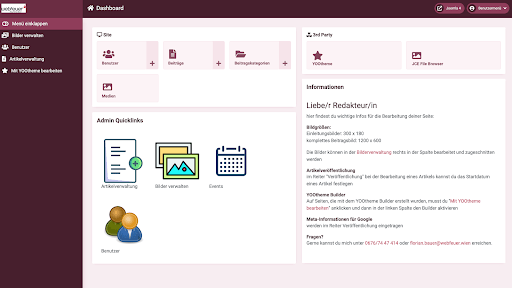
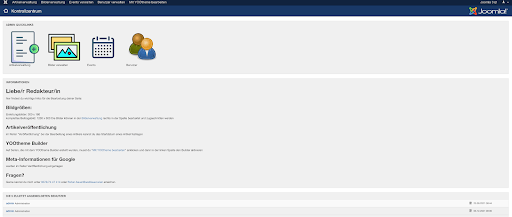
This shows just a few basic options for the tasks the authors should perform:
Add users, add articles, manage media, create events and a quick link to the YOOtheme builder. A custom module lists all the important information like images sizes and short documentation.
How do your clients respond to the custom dashboard options?
They find it extremely helpful to see the stripped down dashboard and be able to focus on what’s important.
Do you have tips for users who want to create a custom dashboard?
Make sure you have a clear overview of what your clients should be able to do with their website. After that, create the access levels and start with adding modules, menu items and information specifically for them.
Share your custom Dashboard(s) with us!
We love to see what kind of clever, creative and inventive custom Dashboard(s) you made! Would you like to share them with us?
Please contact us at

Comments