 Community Magazine

In the September Issue of the Magazine I started a new CSS Series with short explanations of modern CSS properties and functions. Today’s article is about Subgrids.
Grids and Subgrids
The grid layout has been available across browsers since October 2017. It allows you to create a two-dimensional layout defining columns, rows and areas.
As I explained in “Cassiopeia, Joomla’s powerful built-in template: how to modify the header with css grid“ Cassiopeia uses CSS grid for the whole layout and also a category blog is defined as a grid.
But the grid layout has some flaws. We will use a blog as an example. With this CSS, we define a grid with two columns and three rows. Each grid element spans over the three rows:
.grid {
    display: grid;
    grid-template-columns: 1fr 1fr;
    grid-rows: 1fr 1fr 1fr;
}
.grid-item {
    grid-row: 1 / 4;
}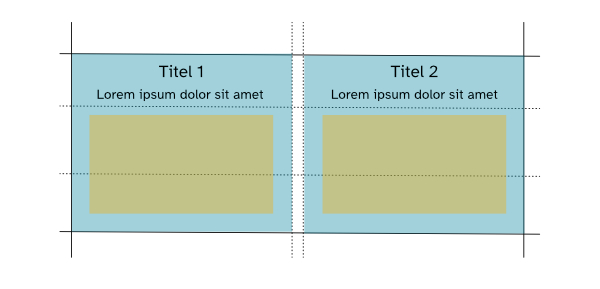
That looks good if titles, intro text and images are the same length / size in each element. But what happens when the intro text of an article is longer?
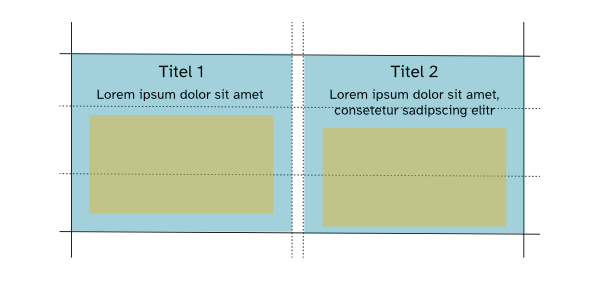
The parts inside of each grid element are not aligned anymore. You can start defining heights and shortening text, but it will solve the problem only for the moment.
And here is where subgrid (baseline since 2023 - see Further readings) plays a role. In a subgrid, the child elements inherit the properties of the parent grid:
.grid {
    display: grid;
    grid-template-columns: 1fr 1fr;
    grid-template-rows: 1fr 1fr 1fr;
}
.grid-item {
    grid-row: 1 / 4;
    display: grid;
    grid-template-rows: subgrid;
}
Now the grid-item has “display: grid” itself and inherits the three rows defined in the parent (you can inherit rows, columns or both). The result looks like this:
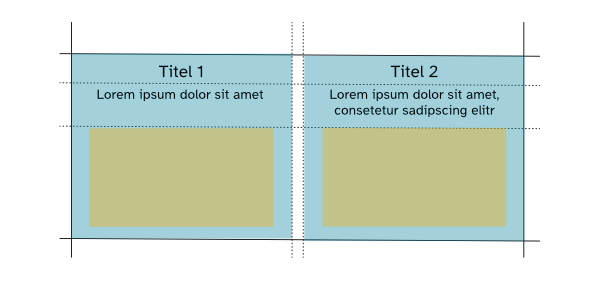
Because the grid items are now connected to each other through subgrid, the elements inside each blog article are aligned again!
Further readings
https://developer.mozilla.org/en-US/docs/Web/CSS/grid
https://developer.mozilla.org/en-US/docs/Web/CSS/CSS_grid_layout/Subgrid
https://webkit.org/blog/17339/subgrid-how-to-line-up-elements-to-your-hearts-content/

Comments