 Community Magazine

Is your website built with K2? Then it's probably still on Joomla 3; K2 won't work with higher versions. To keep your site safe and up to date, you need to find an alternative for K2. The most obvious alternative? Joomla core! This article explains how to do it.
Background
K2 was built to be a complete replacement of the core content/article extension of Joomla. Starting from Joomla 1.5 many website admins and developers installed K2 to get benefits of its powerful features like: extra fields, attachments, tags, multiple category levels, auto resizing uploaded images, image galleries, videos, etc. In addition to some useful modules and plugins. In brief, K2 was used to build many many websites such as blogs, magazines, product catalogs and business directories.
Everything was going smoothly until Joomla 4 was released and the K2 developers team was not willing to update K2 to work with Joomla 4+.
In the meantime, hosting companies started to upgrade to PHP8+, other Joomla developers started to release Joomla 4+ compatible versions of their extensions to get benefits of the improved codebase and the better performance of PHP 8.x compared with PHP 7.x, but K2 was a stumbling block for website admins who are willing to upgrade Joomla. Meanwhile, the powerful custom fields, tags and unlimited category levels have been added to Joomla core and it became possible to migrate back to Joomla content system as a replacement of K2.
In the mid of 2023, a client operating a news and media website asked me to upgrade his website from Joomla 3.x to Joomla 4, K2 was the extension that powers most of the website content, so it was a very challenging project considering the following concerns and challenges.
Challenges
- It was a very large website with +20k articles, thousands of tags, tens of categories. That means no way to manually move them or even to write some SQL statements to migrate them to the Joomla content system.
- As a news portal it is very critical to keep the website on page SEO including SEF URLs, meta keywords and descriptions, etc. in which the client has invested much time to optimize.
- K2 has its own way to upload and store article images, so it needs special care to make sure the articles have the correct images after migration.
- There was a custom K2 plugin that stores some information for each article and this needs to be somehow migrated with the other article information.
Solution Design
To proceed and upgrade the website I had to find a way to migrate K2 database entities into their counterpart Joomla content database entities.
At first glance, I looked for ready tools to do the job but I didn’t find one, at least as of that project date, that means I have to develop my own solution.
I thought it would be time consuming to develop a Joomla component, this is before the AI hype of course :) , so a Joomla CLI application would be optimal for this case, specially with this large size website.
In case you don’t know what is a Joomla CLI (Command Line Interface) application, it is a PHP script designed to run from the command line, as a well versed Joomla administrator you can use them to perform the administration and maintenance tasks within a Joomla environment without using Joomla web interface.
So I started by preparing a table to map K2 and Joomla content entities, it was something like this table:
|
K2 |
Joomla content |
|
Category |
Category |
|
Item |
Content |
|
Extra field group |
Custom field group |
|
Extra field |
Custom field |
|
K2 User (author) |
Joomla User |
|
Tag |
Tag |
|
Image(s) |
Intro and full images |
|
Attachment |
??? |
Also I have prepared a similar table to map K2 item and category options and Joomla article and category options to be included in the migration, this is to minimize the post migration efforts to keep the same layout options, you can take a look at the CLI code if you are interested to know more details on this.
Regarding the category and item images, K2 stores the images in its media folder. The client wanted them all to be moved to the images folder, however the script can be modified to create a folder for each category and move its article images to that folder, this keeps the images folder organized and clean.
Finally this has to be done on the Joomla 3.x website and before the upgrade, obviously it is more safe and controllable to make sure all content is completely migrated before the upgrade.
Migration Process
WARNING: This operation can be aborted for any reason, in this case you must reset the database and start clean again.
In all cases you MUST backup your website and test the migration on a copy before applying it to the live site. So use a backup tool like Akeeba backup or any other convenient tool to keep your website content safe.
Follow these steps carefully to complete the migration successfully:
- Make sure no {category,article} with the same alias already exists, this will prevent migrating the corresponding K2 {category,item}.
- Create the required custom fields and groups if extra fields are used in K2.
- Write down a map of K2 extra field IDs and Joomla custom article IDs, you will need to fill in this
$cfMappingarray in the config.php file, look at step 4 below. - Clone or download the MigrateK2 repository to the cli folder inside your Joomla site's root directory.
- Fill in the required configuration values in the
migratek2/config.phpfile, check the repository README to find more details on this config file. - Open a terminal application on your server.
- Navigate to the document root of your Joomla website.
- Run the script using the command:
php cli/migratek2.php - Keep monitoring the output messages on the screen, you will see something similar to this:
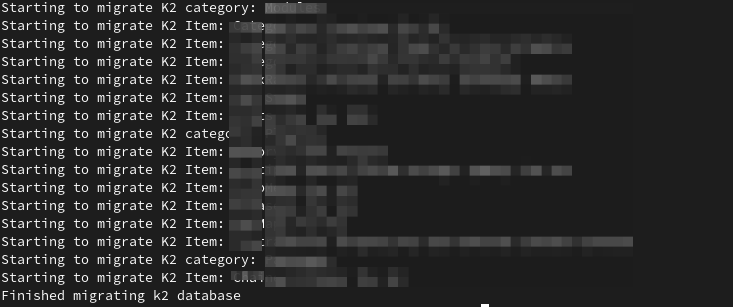
- If any problem happens and the migration is aborted, you can find more helpful information in the log file: migrate_k2.log.php this can be located in your site’s log folder.
- Once the migration process is complete, you will see the message "Finished migrating K2 database."
- Do your post migration auditing to confirm that all database entities are migrated successfully.
- If everything went well, redo the migration on the live site and continue the upgrade process. Otherwise, solve any problems found, reset the database (delete any partial migrated entities) and restart the migration process until it completes successfully.
- Finally, it is safe to uninstall K2, remove its dependent extensions and complete the upgrade process.
Post Upgrade
To keep the same SEF URLs of K2 category, item, tag or author pages, recreate their counterpart article menu items or modify the K2 menu items and set the menu item type to its corresponding article menu item type.
|
K2 Menu Item |
Joomla Menu Item |
|
Categories |
Articles >> Category List |
|
Latest Items |
Articles >> Category Blog |
|
Item |
Articles >> Single Article |
|
Item Edit Form |
Articles >> Create Article |
|
Latest Items From |
Articles >> Category Blog/List |
|
Tag |
Tags >> Tagged Items |
|
User page |
Not supported natively |
At last, you may need to utilize the template and layout overrides to customize the look and implement the design requirements.
The migration execution time depends on the number of categories and items, also it depends on the available processing resources and server configuration. For this case it took about 3 hours to complete migrating more than 20k items and their categories, tags, images, etc.
I wish you a happy and safe migration :) .

Comments