 Community Magazine

3 years ago I built a website which would be constantly updated with new content. More recently I built a mobile phone app that would need to display the same data. This is how I updated everything from one place.
The website data problem
First of all, building a site that is constantly updating initially takes a lot of work. It’s a thankless task manually harvesting details of music events from social media, aggregating them into a website and showing them in date order from the next to happen to some that wouldn’t occur for maybe a year.
My initial effort had been to build a list of events using Facebook data where I could add events to my own Facebook page. I had a long list of events but I didn’t have the tools or ability to extract that information and turn it into web page entries. Even trying to scrape the data failed very early on in the process as some systems don’t have consistently named elements to target.
One of the far-sighted things I’d done when gathering Facebook events was to register a domain name and stick a holding page on it, with a sign-up form to a mailing list. Getting follows on social media is fairly easy, even if it means getting all your friends to follow your page to begin with. And with a web address as the call to action I got quite a few people signing up to a mailing list for a site that didn’t do anything yet.
Next I made a site that used Joomla articles and custom fields, but again that didn’t do exactly what I wanted. Luckily I happened upon the JEvents extension and built another version of the website around that. Skip forward a few years and I have nearly 400 events at one time listed on the website. I didn’t want to be typing more information than I had to and one of tne of the great things about JEvents is that I can create events by uploading a CSV file and process everything using a CRON job, or five.
Look at the numbers
With a healthy growing number of visitors to the website I was seeing a trend for visits from mobile users. This made sense. A lot of people who were already out for the evening were looking for something else to do. Luckily my website was getting a lot of that traffic and I’d spent time working on the mobile layout, getting it to load nice and quickly. Mobile traffic, including tablets, counts for approx 70% of the visitors to the website and that got me thinking that maybe I should get straight on with making this information available via an app and save people having to re-navigate to the website.
There is an app for that
I’ve always been curious about different technologies and have spent countless hours and days trying to make things work, whether it’s programming the drum machine that’s currently sat on my desk or connecting a website with a remote API. About 5 years ago I had an idea for an app after spending some time trying to unpick the React Native code that a client’s mobile app had been built with. I recognised a good deal of the syntax being used having also spent long hours working with JavaScript.
React Native was launched in 2015 as an open source project by Meta and it allowed developers to create iOS and Android apps from one codebase. It uses JavaScript and native code which makes it easier to familiarise with. There’s other app building options, especially now everyone seems to be vibe coding with AI, but I found this was what worked for me, and through Expo I can build and submit from the command line. I am also in control of the code so if something goes wrong I have a reasonable change of debugging it.
I had built a prototype web app using JavaScript to fetch queries from a number of public APIs and once I’d filled in a form with details selected from that query, I could write the entry into a database on a web server somewhere.
This prototype grew and I took the plunge into creating something using React Native, testing it endlessly via XCode on my Mac. The app took shape and I even set it up as a beta instance on my Apple Developer account. But that’s as far as it got as I realised if I could do that, then my music listings website, which was growing in popularity, could be turned into an app version with a great use case, so I turned my focus to that.
Not content
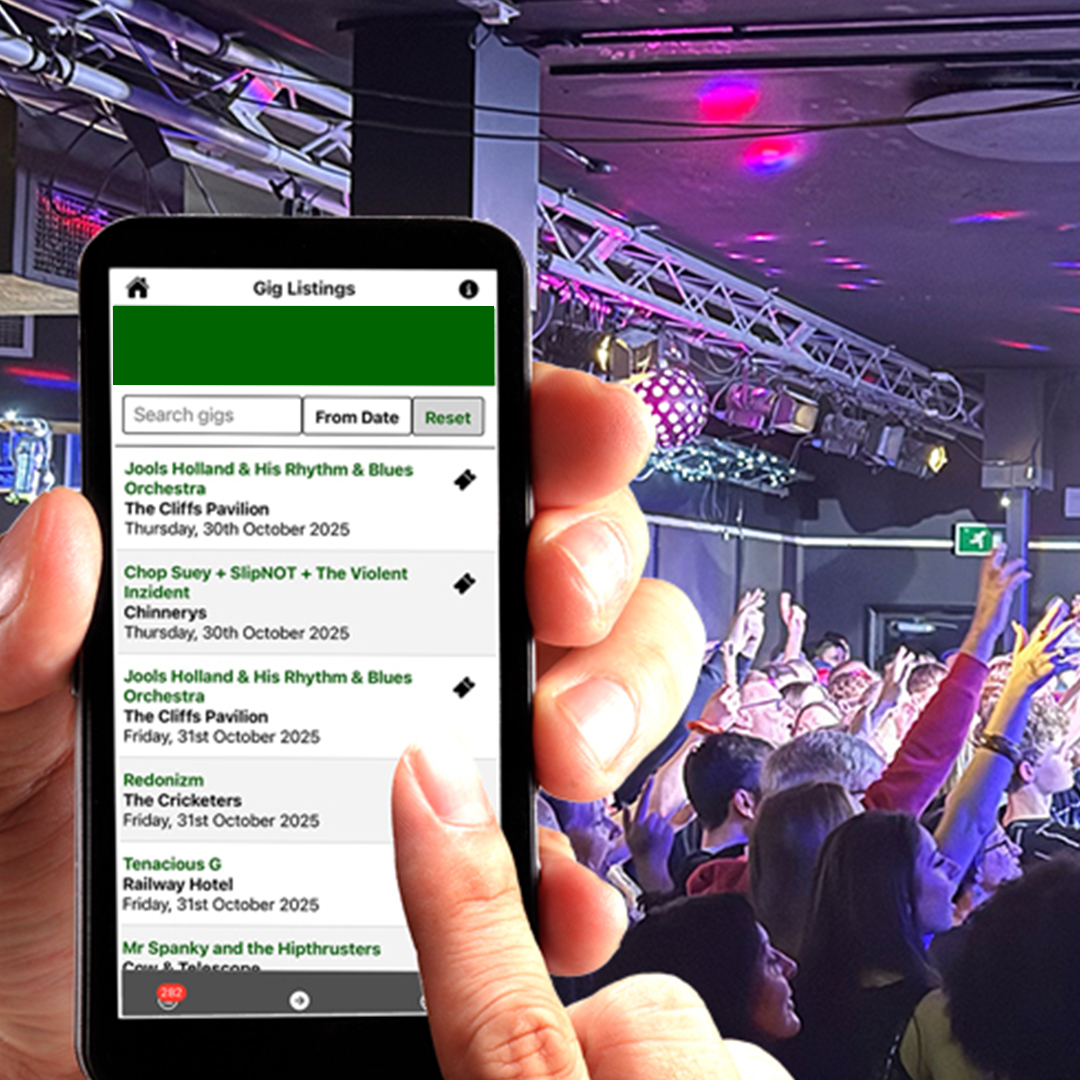
Imagine some time has passed and the app is taking shape. I tend to build things in sweeps so the look and feel is roughly there, sufficient to receive some loosely correct data and for it to appear in a list. Now the app is published, the same data appears but looks so much nicer, and I can click on it and I get more details including the full address of the venue, a nice image of the gig flyer and if it’s relevant, a link to the ticket agent’s website for people to buy tickets.
You may have heard the term headless in relation to CMS use. Some systems like Contentful are made for that kind of delivery out-of-the-box. Other popular CMS’s have been shoe-horned into delivering content other than to their own integrated frontends.
My own need for content took me down the route of looking to see if I could uitlise Joomla’s Web Services API functionality. If you look in the API folder in the root of Joomla you’ll see references to all the components installed on your website. Don’t be surprised if the directory you look in is empty however. That’s how I came to write my own endpoint which queried JEvent’s data on my Joomla website and fed it back to the React Native app using Fetch.
Why would I duplicate content if I’ve already spent some time uploading it to the webserver in the first place? Making the data available meant writing a fairly complicated SQL statement that was designed to retrieve all published events that were going to be happening from today onwards. I process the query with a CRON job so there’s a dataset at the endpoint, not a SQL query waiting to be run. This reduces the load on the server. The datasets can be consumed directly by the React Native app. I have one query for gigs and one for venues, and in the app itself I have a filter that finds all the gigs for a particular venue, which helps if as a user you know you’re going to be in a particular place that evening. You can also filter by name, search from a particular date and more.
Fetch and carry
I mentioned Fetch earlier, this function within the app literally grabs the data from my API endpoint and imports it into a constant in my script which in turn becomes my scrollable list. It’s the same as the JavaScript function which means the syntax is familiar. I also use AWS API Gateway to deal with throttling, caching and security.
I can set a timeout that will call for fresh data if the app is left open. I do the same with the website. If the page has been open in my browser overnight, the next morning will see gigs from that day forward, not past events.
React Native gives me useEffect which triggers events based on the app loading, or data updating. It also contains my data in a Context meaning I don’t have to make unnecessary calls to the API when switching between the gig listing tab and the venues tab.
The other functionality that saves calls back to the endpoint is using AsyncStorage which persists the data stored in the app, and by checking network availability means if there is no WiFi or 4G then, provided the data has been loaded, it will continue to display when offline. The only features that won’t show currently are Google Maps and gig flyer images.
One-to-many
My aim is to be efficient and not to repeat code or content unnecessarily and I feel that in using the data I upload to the website, via CSV files that are then processed by CRON jobs, I am being as economical as possible. This data is shared between the website and the mobile apps giving me more time to spend thinking about growing my audience and even how to monetise it.
The app is available for both iPhone and Android from one codebase, and users have downloaded it and use it when they want to know what’s happening on their night out. Best of all, it hasn’t affected the number of people visiting the website, or booking tickets.
If you’re curious to know more, take a look at my profile and you’ll find a link there to the live site.

Comments