 Community Magazine

In the last issue we showed how web designers can trick out the automatic accessibility checker tools in colour contrast. In this article we shed light on alt-texts.
For a long time, the internet was primarily a visual medium, leaving users with visual impairments excluded from much of its content - especially images and other non-text elements.
So we would assume that all web developers and authors know what alt texts are and what they are needed for but one of the most common errors on websites still is missing alt-texts and - what is worse: wrong alt-texts.
This article examines the limitations of current accessibility tools in handling non-textual elements and why manual testing and human judgment are essential to meet the WCAG22 non-text-content requirement: every non-text content must have a meaningful text alternative.
Joomla supports the production of alt-texts if images are selected from media: 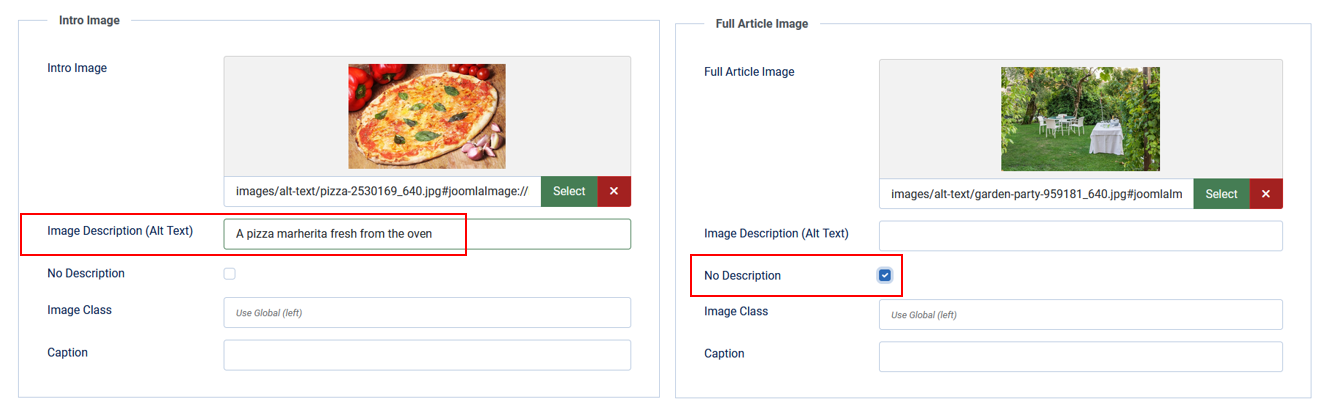
Or also in the core editor tinyMCE

Visual Content
You can hardly imagine a website without any images or icons, do you? Images must have alt-text.
The test is very easy: Parse every <img if there is an alt attribute. Every tool can do this check. Why then do I write an article?
Let's do a small test. I made a site with an invitation to my garden party, and I made photos of all the food I will prepare.
For our test I removed all images from the site, leaving only alt-texts to see and to hear.
How to remove all images the easy way? You can use the web developer tools or simply remove your image folders.

Here is the result:
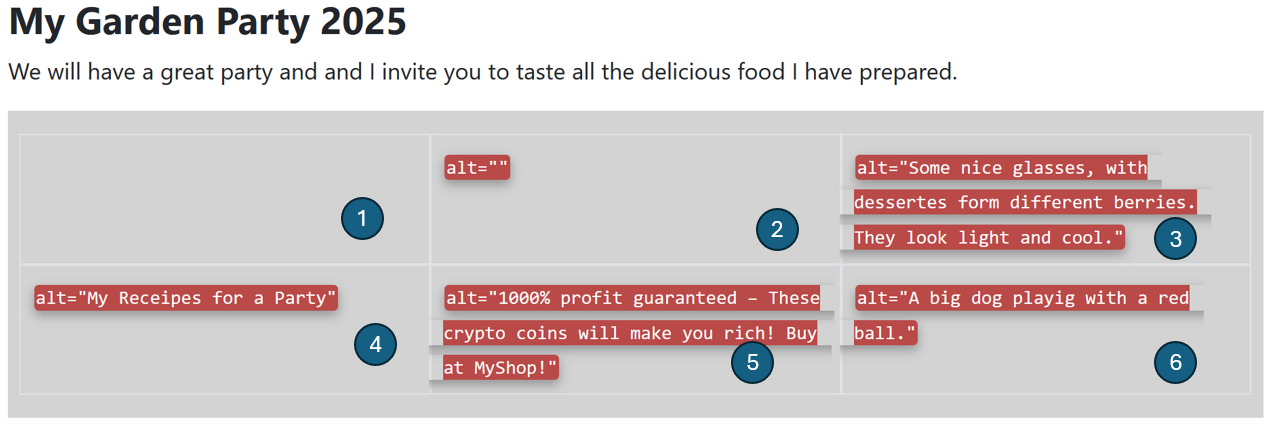
What do you think? Not very informative, right?
There are many errors:
1: No alt-text
2: The image is not decorative in this context, the empty alt-text is wrong.
4: Not meaningful
5: Black Hat SEO
6: Wrong description
Wrong descriptions as in images 4 and 6 often are caused by copy/paste errors. Or authors who did not understand the meaning of alt-texts.
Seeing or hearing these alt-text, will you write to me "Thank you - it will be a great party"!
Or "Uhh - no thanks, I already have an appointment on this day"?
Here is the same page with better alt-texts.

This is better, isn't it? And for sighted users, here are the images:

There are many different methods of adding images into a site, as icon, as svg image, as photo or graphic, but no matter what it is: Writing meaningful alt-texts is hard work. If you think that AI generated alt-text could be a solution - it is not. Read this article on AI generated alt texts.
Test Results
Tests with different images and different errors on alt-texts were performed with free tools WAVE, AXE, IMB Accessibility Checker, Lighthouse, supported by Web Developer Tools and the screenreader NVDA.
The test covered a big range of different types of images and many possible kinds of errors in alt-texts.
All Tools find missing alt-texts and accept empty alt-text.
No tool finds wrong or misleading alt-texts.
Only the IBM Accessibility Checker gives a warning if
- <svg> elements don’t have a description (i.e. social media icons).
- the filename is used as alt-text
Only WAVE gives a warning if
- a linked image has the same alt-text as the link name
- an alt-text is very long
Our accessibility jooa11y gives a warning if an alt-text is longer than 100 characters.
Web Developer Tools are useful for making alt-texts visible.
The free NVDA was used as screenreader. It has no problem with missing alt-text, simply ignores the image.
There are other screenreaders out there who read the filname (for example "Screenshot 2025-05-25 165104.png") in full length if there is no alt-text at all.
Conclusion
While automatic accessibility checkers are valuable tools for identifying some formal accessibility issues, they fall short when evaluating non-text content such as images and audio. The effectiveness of image descriptions depends heavily on context.
So don't blindly trust the tools: the final check should always be human!
While we are regarding alt-text for images as non-text content, and at least have a little help from different tools, there is nothing, that can automatically test audio content on your site, except yourself. Podcasts, videos, video-tutorials exclude users with hearing disabilities if there is no transcription or if this transcription is not appropriate.

Comments