 Community Magazine

Joomla’s Weblinks component is a handy tool for organizing links, but it needed a refresh to keep up with Joomla 5 standards and the upcoming Joomla 6. Through GSoC 2025, I introduced features like frontend dashboard for weblinks and a pre-configured cloud environment for testing and more. These updates let users handle their weblinks more efficiently and give developers a model for building their own extension. This article explores the changes and how they can save time for both site admins and developers.
This summer, I worked on the Joomla Weblinks Enhancements project through GSoC. The aim was direct but broad: update the Weblinks component to align with Joomla 5 requirements and the upcoming Joomla 6, boost its ease of use, and position it as a reference for other developers. In this post, I’ll explain what Weblinks offers, provide a practical demonstration of its new capabilities, and describe how its repository can assist you in developing your own Joomla extensions.
What Was the Weblinks Enhancements Project About?
The Joomla Weblinks component lets users manage and display external links on their websites, like a directory for resources, partner sites, or curated lists. It can be used for things like a school website linking to study tools or a business showcasing partner links. My GSoC mission was to bring this extension up to Joomla 5 standards, fix bugs, add new features, and make it a model for other developers. I wanted to make it easier for users to manage links and for developers to build on it with solid tests and tools.
How to Use the New Weblinks Features
During the project, I added several updates to Weblinks to make it more functional for users. Below, I’ll explain each one with steps on how to set them up and use them on your site.
Using the Frontend Dashboard
The frontend dashboard gives users a dedicated space to manage their weblinks without accessing the backend. This is useful for sites where contributors submit links regularly, like community resource hubs.
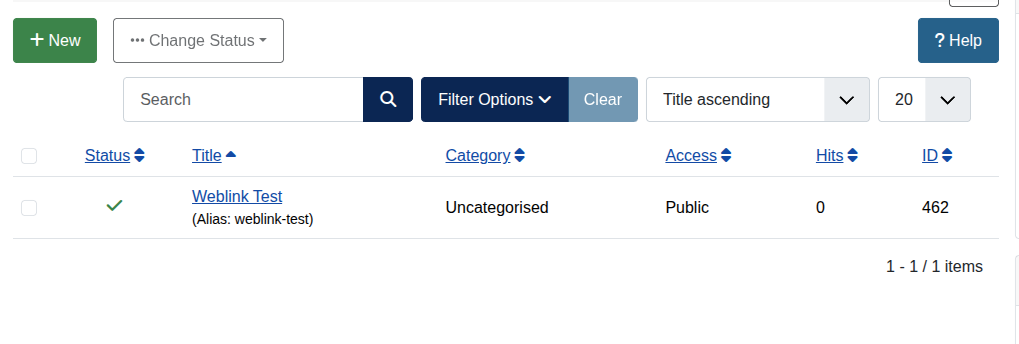
To set it up:
-
Create a new menu item: Go to Menus > Main Menu (or any other menu) > New, select Weblinks as the menu type, and choose "Weblinks Management Dashboard" as the view.
-
Log in as a user on the frontend and navigate to the menu item – you’ll see a list of your weblinks with buttons to edit, delete, or add new ones (if the user has the permissions).
-
For example, you can click on a link to update its details directly, or "Add" to submit a fresh entry.
Improved Frontend Form
I matched the frontend submission form to the backend by adding tabs for options and publishing. This lets you handle advanced settings like metadata or scheduled publishing from the frontend.
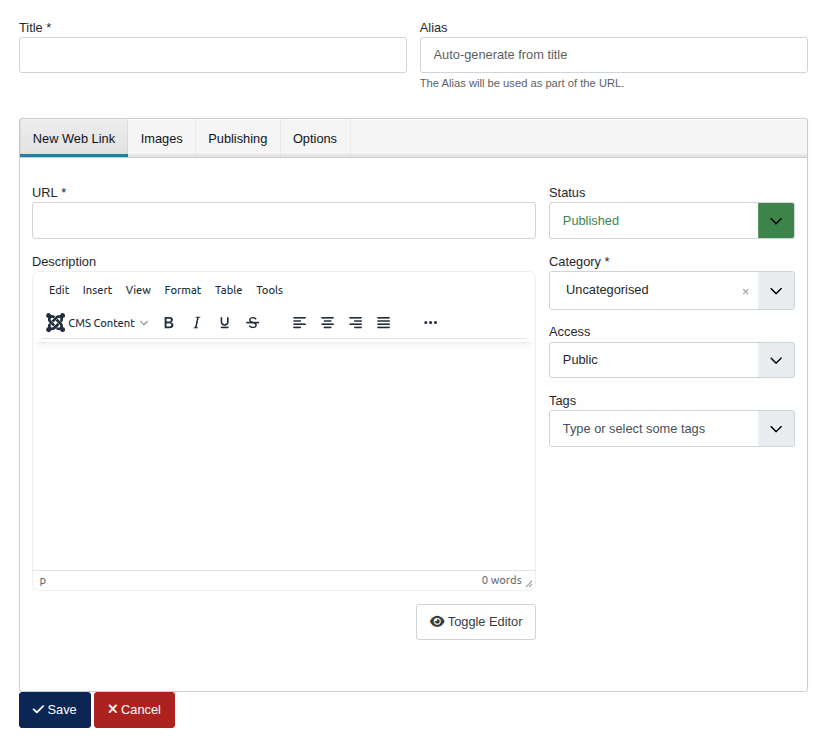
To implement it:
-
Create a menu item for Weblinks submission: Menus > Main Menu (or any other menu) > New > Weblinks > Submit a Weblink.
-
On the frontend, access the menu item and fill out the form – you’ll see tabs like "Options" for metadata (e.g., set SEO title or description) and "Publishing" for dates (e.g., schedule when the link goes live).
-
Submit the form, and the link will appear in your dashboard or category view, with all settings applied.
Setting Up Nested Category Support in the Module
Nested categories allow hierarchical display of links in the Weblinks module, with control over depth levels and parent visibility. It's ideal for organized directories, like categorizing resources by topic and subtopic.
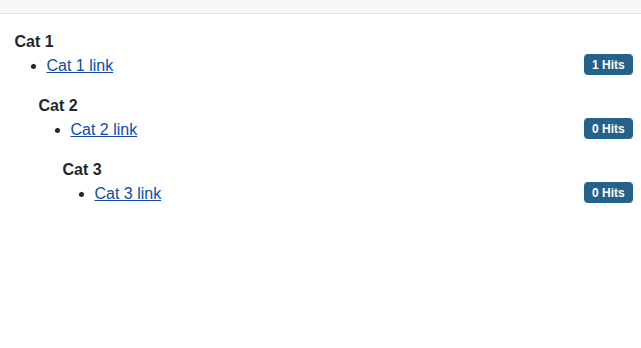
To configure it:
-
In the backend, go to Site Modules > New > Web Links.
-
Select a parent category, then in the module options, enable "Show Child Categories" and set the "Subcategory Level" (e.g., 2 for two sublevels), with the option of toggling "Show Parent Category" on or off
-
Publish the module to a position on your site, and it’ll render links in a structured list, like a tree view for navigation.
Working with Cloud Development in Github Codespaces
Github Codespaces turns Weblinks into a cloud-based development environment, pre-configured with Joomla, phpMyAdmin, and XDebug. It's great for testing without local setup.
To get started:
-
On the Weblinks repository, click "Code" > "Open with Codespaces" – it builds the environment automatically.
-
Check ‘codespace-details.txt’ for credentials once ready.
-
Access Joomla: In VS Code's Ports tab, click the globe for the web server to open the Joomla site; log in with admin details.
-
Manage the database: You can use phpMyAdmin on the setup, and use it to view or edit tables like #__weblinks.
-
Run Cypress tests: In the terminal, type ‘npx cypress open’, then open the Cypress port to select and execute tests.
-
Test pull requests: Use the GitHub extension in VS Code, find a PR, click "Checkout", and changes apply instantly to your Joomla instance.
You can read more about setting up codespaces with Joomla here, or in the weblinks README: https://manual.joomla.org/docs/5.4/testing/manually/github-codespaces/
Utilizing Changelog and QuickIcon Features
The Changelogs tracks Weblinks updates made, and lists changes in the ‘Extensions’ tab when you search for weblinks.

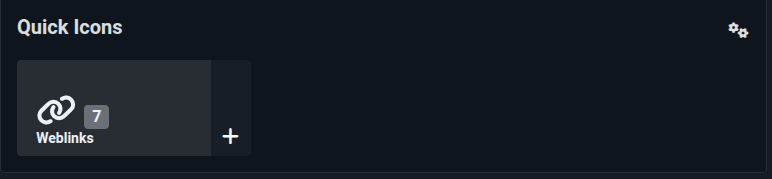
The QuickIcon plugin adds a shortcut in the admin dashboard:
-
Create a QuickIcon module from ‘Administrator Modules’.
-
Enable ‘Weblinks - QuickIcon’ plugin.
-
You should see a shortcut to weblinks inside the QuickIcon module.
Future Proof: Full Joomla 6 Compatibility
A core goal of this project was to look ahead. Weblinks is now fully compatible with the upcoming Joomla 6 release. This ensures a seamless upgrade path for site administrators, guaranteeing stability and long-term support without worrying about breaking changes when Joomla 6 becomes stable.
Weblinks as a Blueprint for Your Own Component
Weblinks isn't just a component, it's a template for building your own Joomla component. The repository shows how to structure files, set up tests, and integrate tools. For your project:
Repo Setup: Clone Weblinks, note the composer.json for PHP dependencies and package.json for JS. Adapt the manifest.xml for your extension details.
Component Structure: Use src for code, tests for Cypress, and .devcontainer for Github Codespaces setup. Inheritance from Joomla's MVC for models, views, and controllers.
Adding Tests: Follow the Cypress folder: integration for admin/site tests, fixtures for data, support for commands. Customize cypress.config.js with your baseUrl.
What's Next for Weblinks?
This GSoC project marks a new beginning for the Weblinks component. It's now a robust, modern extension and a living blueprint for Joomla 5 development, with full compatibility for Joomla 6 to support long-term site plans. The foundation is set for exciting future improvements.
The Joomla community is what makes projects like this possible. I'm truly grateful for the guidance and support I received. To any developer, new or experienced, I encourage you to get involved. Clone the Weblinks repository, spin it up in Codespaces, and see the structure for yourself. Your perspective and contributions are what will keep Joomla thriving.
Links:
-
Project Description: https://summerofcode.withgoogle.com/programs/2025/projects/xZ08EQgY
-
GSoC Repository: https://github.com/joomla-projects/gsoc25_weblinks
-
Main Repository: https://github.com/joomla-extensions/weblinks
-
Weekly Reports: https://volunteers.joomla.org/teams/google-summer-of-code-joomla-team#reports
-
Pull Requests: https://github.com/joomla-projects/gsoc25_weblinks/pulls?q=is%3Apr+is%3Aclosed
Thanks for following along with this journey! I can’t wait to keep contributing to Joomla and see what other developers bring to the community!

Comments