 Community Magazine
Building a conference (or any other) website doesn’t begin with design; it starts with a clear plan for content and functionality. As developers and organizers, we know a beautiful site is useless without a strategically organized approach. In this article we'll explore how to make the most of Joomla Core to build a conference website that delivers.
Step 1: Define the structure
Our conference website should consist of the following menu items:
- Startpage
- News
- Location and Accomodation
- Tickets
- Speakers
- Program
- Sponsors
- Legal notes, Terms & Conditions, Privacy Policy
Step 2: Define functionality
- Speakers should be able to register, submit talks and edit a profile with photo and bio
- The team should be able to review and publish accepted talks / speakers
Step 3: Define content types
Defining content types is helpful to decide if there is a need for an extension or if Core is enough.
Startpage
Banner with logo, date and location: Custom Module
Welcoming text: Article as main content
News: Articles Module
News
Articles as category blog
Location
Single article
Tickets
Extension or external service
Speakers
Contacts component: offers connection between articles (talks) and users (speakers)
Program
Articles as category blog (override) or Articles Module
Sponsors
Articles Module
General information
(Legal notes, Terms & Conditions, Privacy Policy)
Single articles
After checking some event extensions, we decided to go with just Core.
In this article I will go into the details for the “Call for Speakers”.
Step 4: Preparatives
- Create a user group “Speakers” as a child from “Registered”
- Allow user registration with activation by the user
- Create a category “Talks” and give the user group “Speakers” permission to create and edit own articles
- Create a contact category “Speakers” and give the user group “Speakers” permission to edit own
- Activate the plugin “User - Contact Creator” setting category “Speakers” as default and “Automatically Publish the Contact” to No. The plugin will automatically create a contact when a user register into the website
- Create a menu item for registration
- Create menu items for login and logout
- Create an article “Thank you” with information about the next steps and link to it in a menu item (hidden)
- Create an article “My page” and the corresponding menu item, here we will publish specific information for the logged in speaker
- Create a menu item to submit an article, in the options specify the category “Talks” and redirect the user to the “Thank you” page after submission
- For a better overview put the menu items related to Speakers into an own menu (Speakers Menu) with following access levels:
- “Register” -> guest access
- “Submit talk” -> registered access
- “My page” -> registered access
- “Logout” -> registered access
- “Thank you” -> registered access and hidden
Registration and login
The Joomla core functions are fine and don't need further work.
Submit article (talk)
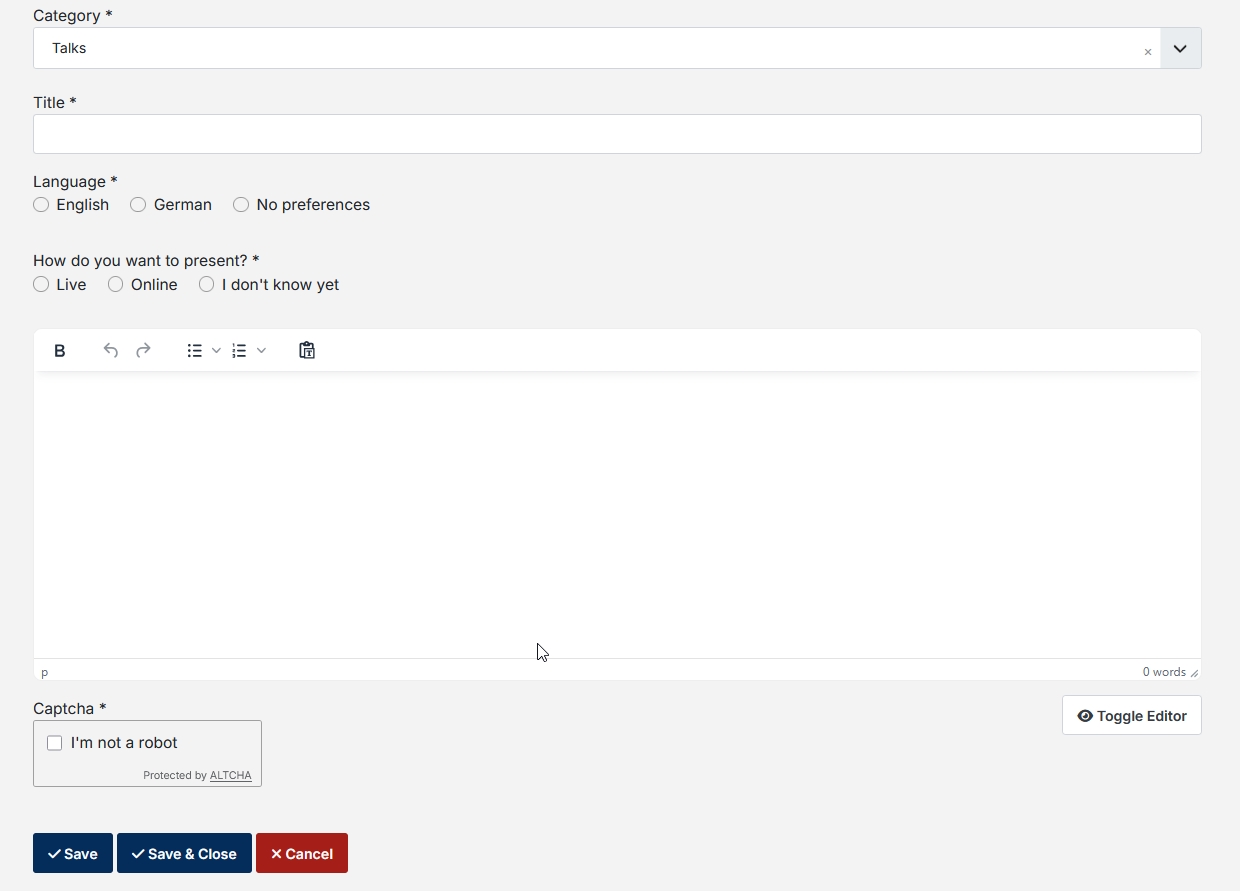
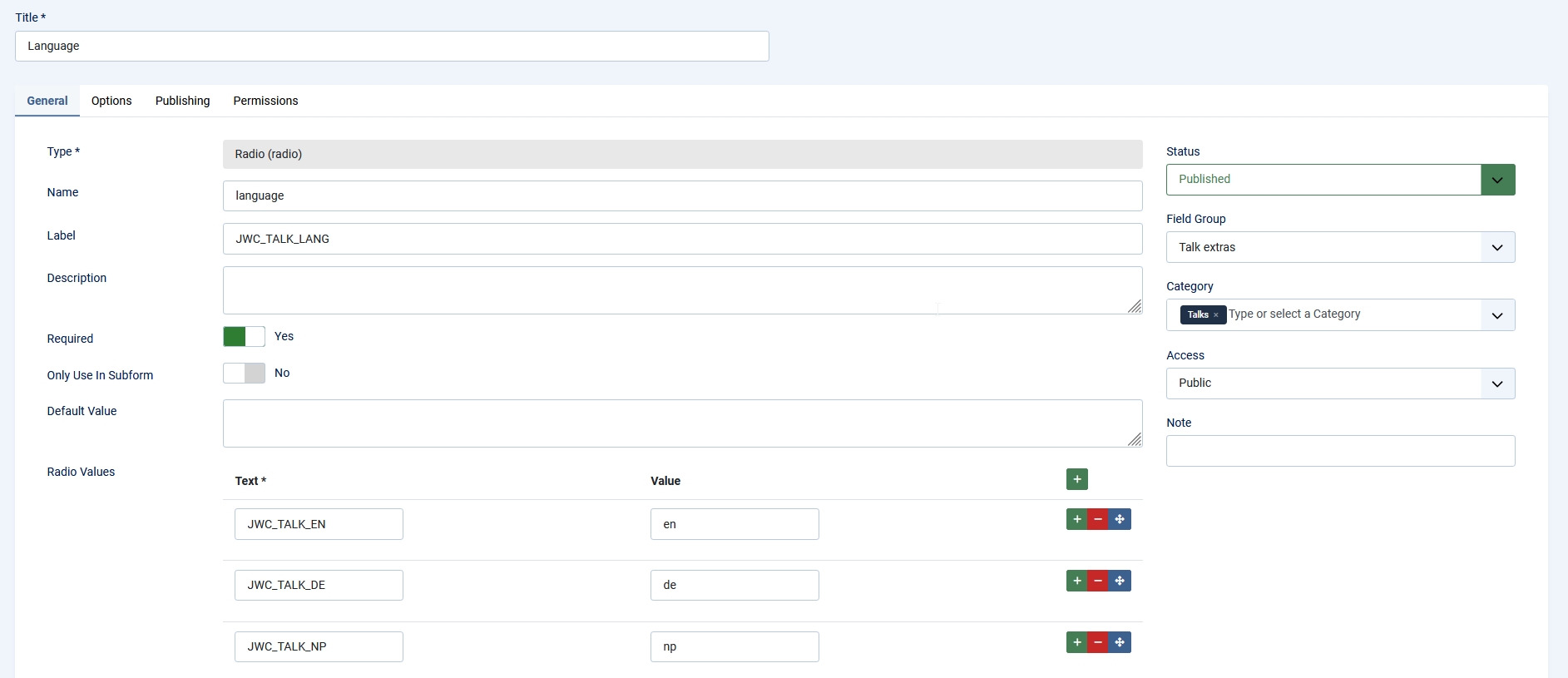
A talk is a Joomla article and the submission should be as easy as possible. A talk needs a title and a description. Since our conference will offer talks in English and in German, we want to ask the preference of the speaker. For that we create a custom field of type radio with the options: English, German and No preferences. Furthermore we offer the possibility to give the talk from remote. Here we need also a radio custom field with the options: Live, Online and I don’t know yet.
To make the submission of a talk easy we will create an override of com_content/form/edit.php. In the override we remove the tabs layout and all (for our usecase) unnecessary elements and render the custom field manually:
<?php

/**
 * @package     Joomla.Site
 * @subpackage  com_content
 *
 * @copyright   (C) 2009 Open Source Matters, Inc. <https://www.joomla.org>
 * @license     GNU General Public License version 2 or later; see LICENSE.txt
 */

defined('_JEXEC') or die;

use Joomla\CMS\HTML\HTMLHelper;
use Joomla\CMS\Language\Multilanguage;
use Joomla\CMS\Language\Text;
use Joomla\CMS\Layout\LayoutHelper;
use Joomla\CMS\Router\Route;

/** @var \Joomla\Component\Content\Site\View\Form\HtmlView $this */
/** @var Joomla\CMS\WebAsset\WebAssetManager $wa */
$wa = $this->getDocument()->getWebAssetManager();
$wa->useScript('keepalive')
    ->useScript('form.validate')
    ->useScript('com_content.form-edit');

$this->tab_name = 'com-content-form';
$this->ignore_fieldsets = ['image-intro', 'image-full', 'jmetadata', 'item_associations'];
$this->useCoreUI = true;

// Create shortcut to parameters.
$params = $this->state->get('params');

// This checks if the editor config options have ever been saved. If they haven't they will fall back to the original settings
if (!$params->exists('show_publishing_options')) {
    $params->set('show_urls_images_frontend', '0');
}
?>
<div class="edit item-page">
    <?php if ($params->get('show_page_heading')) : ?>
    <div class="page-header">
        <h1>
            <?php echo $this->escape($params->get('page_heading')); ?>
        </h1>
    </div>
    <?php endif; ?>

    <form action="<?php echo Route::_('index.php'); ?>" method="post" name="adminForm" id="adminForm" class="form-validate form-vertical">
        <fieldset>

            <?php echo $this->form->renderField('catid'); ?>

            <?php echo $this->form->renderField('title'); ?>

            <?php if (is_null($this->item->id)) : ?>
                <?php $this->form->setFieldAttribute('alias', 'type', 'hidden'); ?>
                <?php echo $this->form->renderField('alias'); ?>
            <?php endif; ?>

            <?php echo $this->form->renderField('language', 'com_fields'); ?>

            <?php echo $this->form->renderField('typ', 'com_fields'); ?>

            <?php echo $this->form->renderField('articletext'); ?>

            <?php if ($this->captchaEnabled) : ?>
                <?php echo $this->form->renderField('captcha'); ?>
            <?php endif; ?>

            <?php if ($this->item->params->get('access-change')) : ?>
                <?php echo $this->form->renderField('featured'); ?>
                <?php if ($params->get('show_publishing_options', 1) == 1) : ?>
                    <?php echo $this->form->renderField('featured_up'); ?>
                    <?php echo $this->form->renderField('featured_down'); ?>
                    <?php echo $this->form->renderField('publish_up'); ?>
                    <?php echo $this->form->renderField('publish_down'); ?>
                <?php endif; ?>
            <?php endif; ?>

             <?php if (Multilanguage::isEnabled()) : ?>
                <?php $this->form->setFieldAttribute('language', 'type', 'hidden'); ?>
                <?php echo $this->form->renderField('language'); ?>
            <?php endif; ?>

            <?php echo $this->form->renderControlFields(); ?>
        </fieldset>
        <div class="d-grid gap-2 d-sm-block mb-2">
            <button type="button" class="btn btn-primary" data-submit-task="article.apply">
                <span class="icon-check" aria-hidden="true"></span>
                <?php echo Text::_('JSAVE'); ?>
            </button>
            <button type="button" class="btn btn-primary" data-submit-task="article.save">
                <span class="icon-check" aria-hidden="true"></span>
                <?php echo Text::_('JSAVEANDCLOSE'); ?>
            </button>
            <?php if ($this->showSaveAsCopy) : ?>
                <button type="button" class="btn btn-primary" data-submit-task="article.save2copy">
                    <span class="icon-copy" aria-hidden="true"></span>
                    <?php echo Text::_('JSAVEASCOPY'); ?>
                </button>
            <?php endif; ?>
            <button type="button" class="btn btn-danger" data-submit-task="article.cancel">
                <span class="icon-times" aria-hidden="true"></span>
                <?php echo Text::_('JCANCEL'); ?>
            </button>
            <?php if ($params->get('save_history', 0) && $this->item->id) : ?>
                <?php echo $this->form->getInput('contenthistory'); ?>
            <?php endif; ?>
        </div>
    </form>
</div>
The form looks like this:
Fields
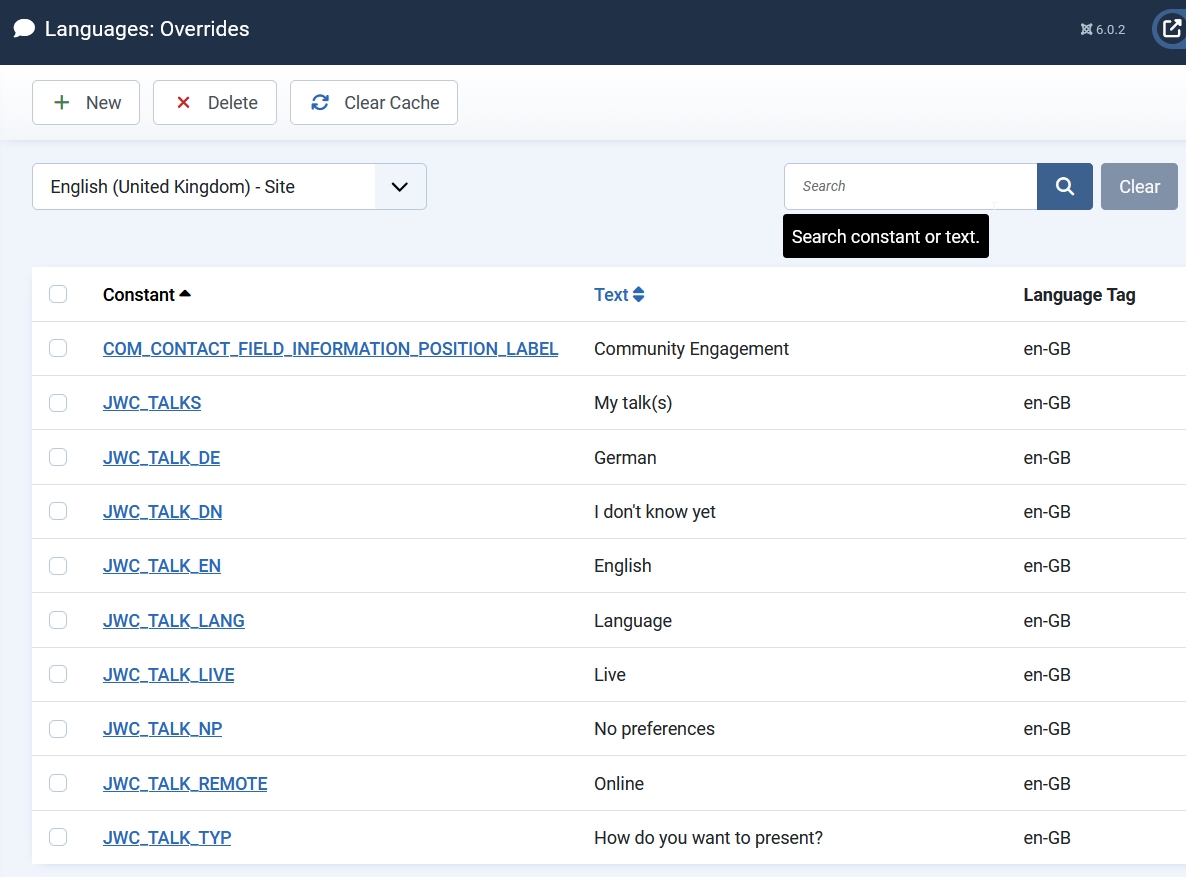
The website will be at least bilingual (English and German). In order to get the custom fields in the two languages we use language strings and language overrides for the labels and the values:
Editor
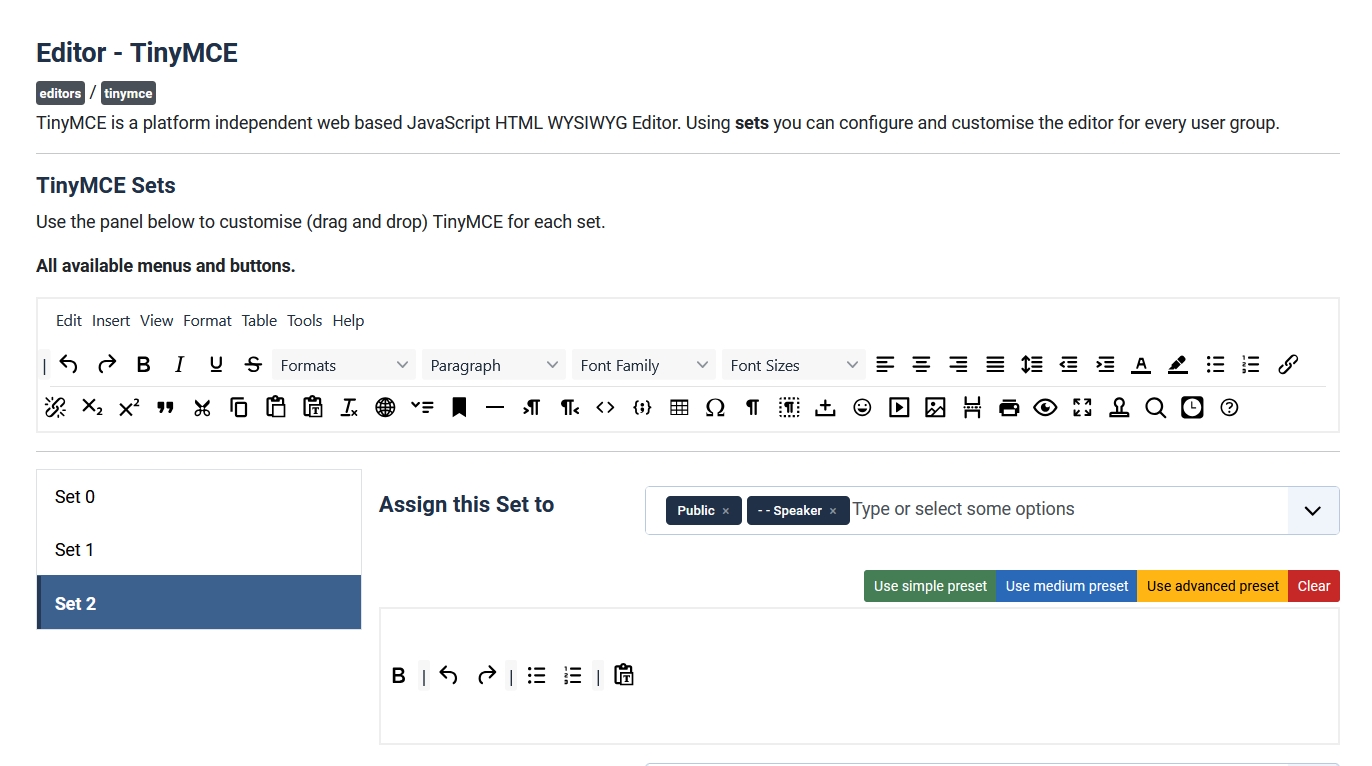
As you can see in the submit form above the editor field offers very little formatting options. That is on purpose and we achieve that modifying the sets in the TinyMCE plugin:
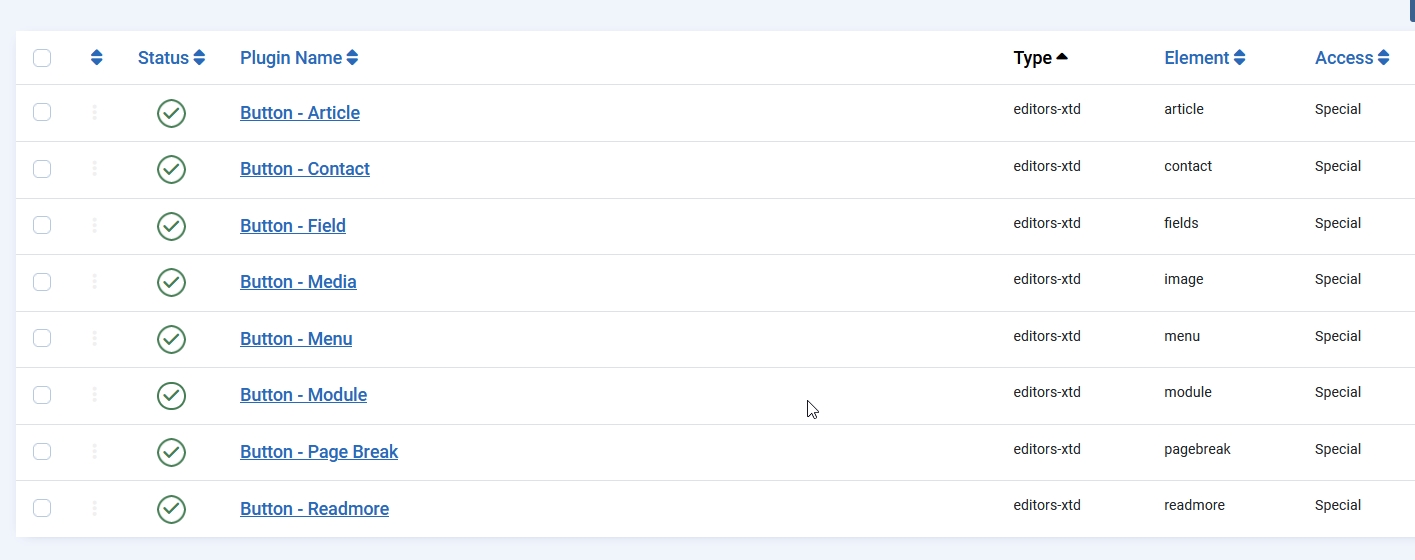
The button “CMS content” can be removed changing the access level of the editor buttons plugins:
After submission
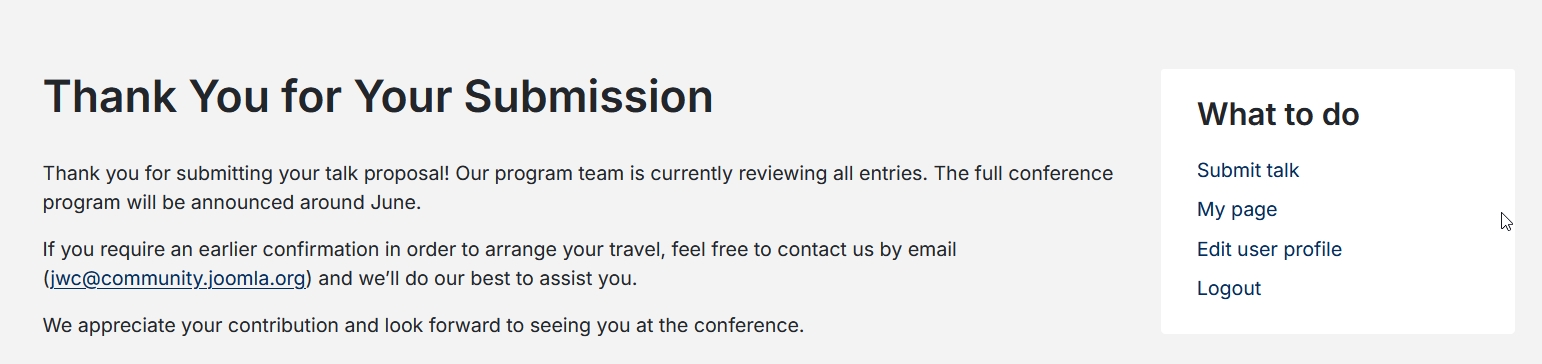
After submitting a talk the speaker will be redirected to the “Thank you” page:
What happens next? I will show you that in the next article ;-) Stay tuned!
The development of the Joomla World Conference 2026 website (conference.joomla.org) is nearing completion, and we’re thrilled to announce that ticket sales will be opening shortly! This article has showcased the strategic planning behind this exciting initiative. Now it’s your turn to get involved. Submit your talk proposals and prepare to join us on October 16-18, in Potsdam, Germany, for an exceptional Joomla experience.
Read this in Italian: https://www.joomlaitalia.it/guide-e-tutorial/traduzioni-joomla-magazine/come-creare-un-sito-web-per-conferenze-con-joomla-core

Comments