The Joomla! ® Community Magazine

How to convert Joomla 1.5 template to Joomla 2.5 template

Written by Tuan Bui | Tuesday, 01 May 2012 00:00 | Published in 2012 May
Level of Difficulty:Intermediate In this tutorial, we will show how to convert a Joomla 1.5 template to Joomla 2.5 template. We will take default Joomla 1.5 template "rhuk_milkyway" as an example and convert it to Joomla 2.5 native compatible template.

Note:

This tutorial covers only the template conversion process, so it's assumed that you already have a Joomla 2.5 website installed, or converted from version 1.5.

There are 5 steps involved.

  1. Make a copy of all Joomla 1.5 template files
  2. Edit files structure
  3. Edit file "templateDetails.xml"
  4. Edit file "index.php"
  5. Install and test the converted Joomla 2.5 template

Step 1. Make a copy all Joomla 1.5 template files

The first thing to do is to copy the whole theme folder from version 1.5 to version 2.5
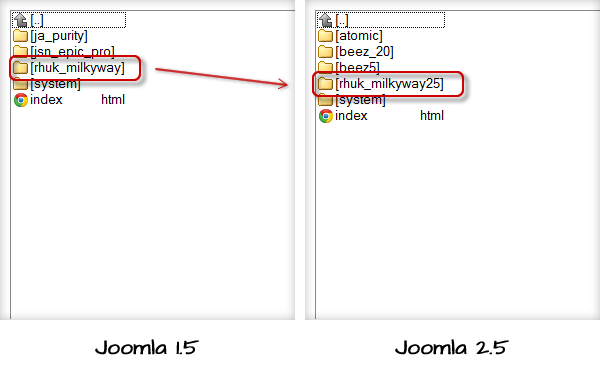
Copy whole Joomla template folder

Copy the whole template folder

  1. Go to the theme folder in Joomla 2.5 website
  2. Create a folder named "rhuk_milkyway25"
  3. Copy all files from folder "rhuk_milkyway" in Joomla 1.5 template folder to folder created in point 2.

Step 2. Edit files structure

Now, you need to edit the folder structure to make it compatible with Joomla 2.5
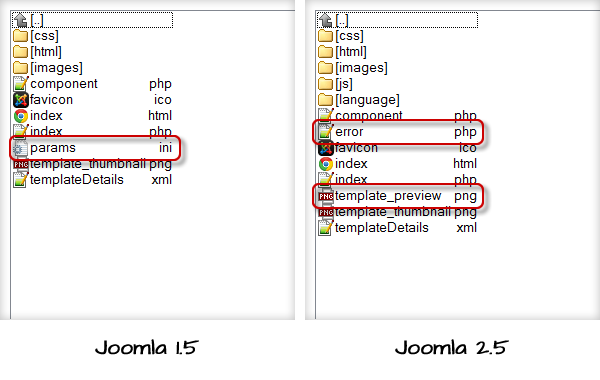
Edit folder structure to make it compatible

Edit folder structure to make it compatible

  1. Delete file "params.ini"
  2. In version 1.5 this file used to store values of template parameters. But in version 2.5, all template parameters are stored in the database. So there is no need for file "params.ini".

  3. Copy file "error.php" from default Joomla 2.5 template "atomic"
  4. Joomla 2.5 introduces new file "error.php" to contain layout of error pages. This file is simple and we can reuse the file from default theme "atomic".

  5. Create new file "template_preview.png"
  6. Joomla 2.5 introduces new file "template_preview.png" to present a big preview image of the theme. You need to make a 640x480 screenshot of your theme and name it "template_preview.png".

Step 3. Edit file "templateDetails.xml"

Now, you need to edit file "templateDetails.xml" to make it compatible with version 2.5.

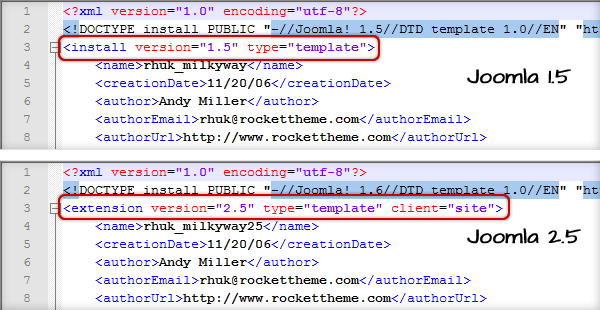
  1. Rename tag <install> to <extension>

Edit file "templateDetails.xml"

Old value

New value

<install version="1.5"...

<extension version="2.5"...

</install>

</extension>

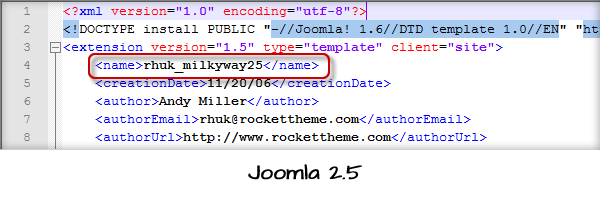
  1. Change template name in tag <name>

Change template name in tag <name>

  1. Replace multiple tags <filename> with single tag <folder>
  2. This is very cool feature of Joomla 2.5. Now you don't need to declare all the files in some folder, you just need to declare that folder.
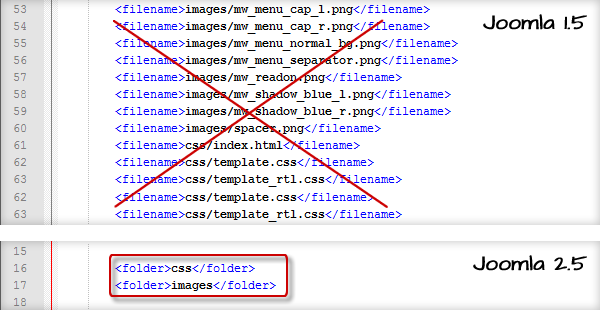
Declare file folder

  1. Delete declaration for file "params.ini"
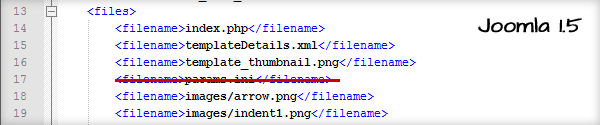
 Delete declaration for file "params.ini"

  1. Add declaration for new files created in step 2
  2. Add 2 following tags:

    1. <filename>error.php</filename>
    2. <filename>template_preview.png</filename>

     Add declaration for new files

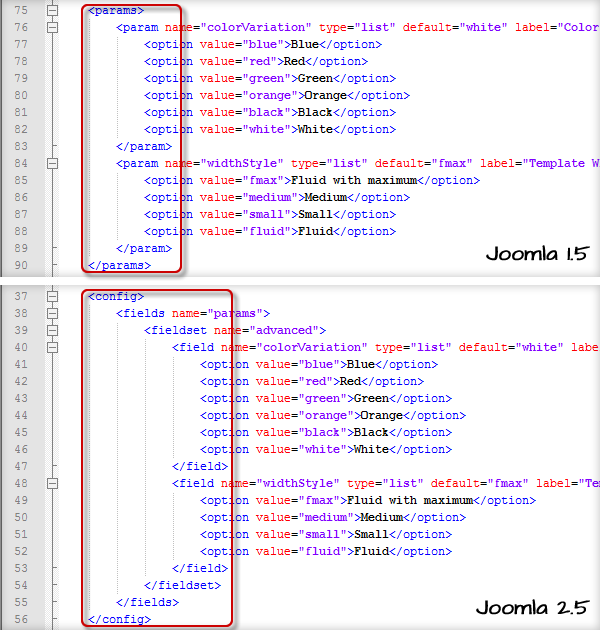
  1. Rename tags in section <params>

Rename tags in section <params>

Old value

New value

<params>

<config>
<fields name="params">
<fieldset name="advanced">

<param...

< field...

</param>

</ field>

</params>

</fieldset>
</fields>
</config>

Step 4. Edit file "index.php"

After editing file "templateDetails.xml", you need to continue to edit file "index.php".

  1. Add PHP code to load Mootool library
  2. Add code string "JHtml::_('behavior.framework', true);" to the location as seen on the screenshot bellow.
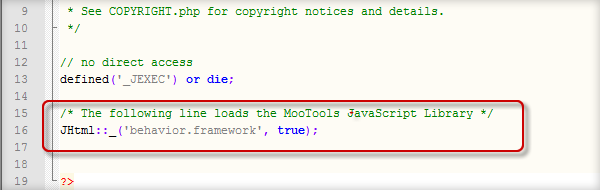
Add PHP code to load Mootool library

  1. Replace template name text "rhuk_milkyway" with php code
  2. Joomla 2.5 allows you to get the theme name directly from file "templateDetails.xml" file, so there is no need to declare the theme name as plain text.
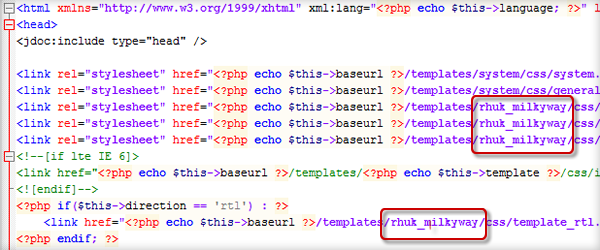
Replace template name

Old Value

New value

rhuk_milkyway

<?php echo $this->template ?>

Step 5. Install and test converted Joomla 2.5 template

Now, the converted Joomla 2.5 template is presented in templates folder, but you won't see new theme in Template Manager, because it's not installed yet. Make following steps:

  1. Go to Administrator > Extensions > Extension Manager > Discover.
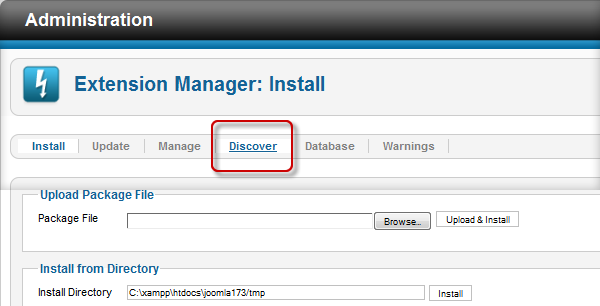
Choose Discover tab in Extension Manager

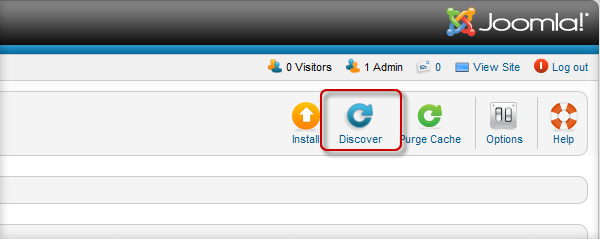
  1. Click button "Discover" on toolbar

Click button "Discover" on toolbar

Select the item "rhuk_milkyway25" in the list and click button "Install"
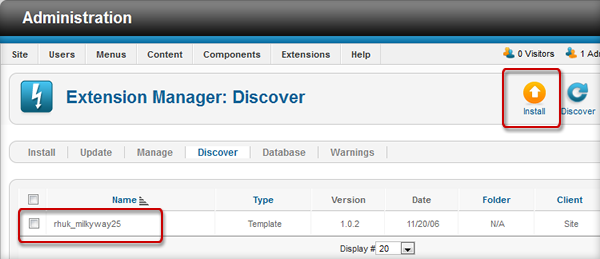
Choose the Joomla 2.5 template to install

  1. Now, the Joomla 2.5 template is installed and you can go to "Template Manager" to set it as default.
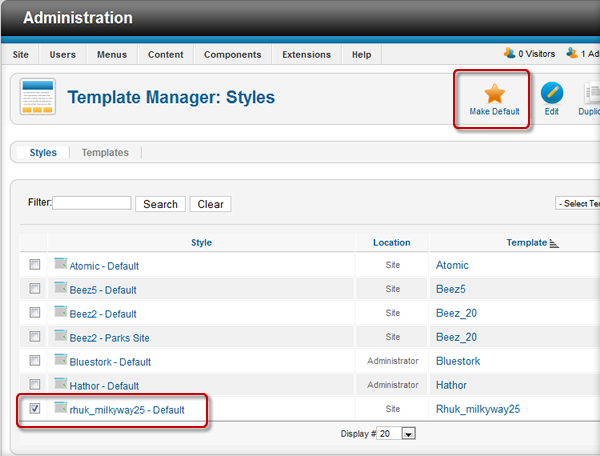
Set the new Joomla 2.5 template as default

We finished the Joomla template migration with template "rhuk_milkyway" for today. Do you have any other ways to convert your template from version 1.5 to version 2.5 ? Please share using comment form belows. Feel free to leave questions if you get trouble with this migration process.

Read 116965 times
Tagged under Designers
Tuan Bui

Tuan Bui

Tuan is the Joomla Fan lover at www.JoomlaShine.com. In spare time he blogs about Online Marketing from the concept to concrete case studies. Exploring his blog posts you will see truly the meaning of the "Quality Content".

Leave a comment

Make sure you enter the (*) required information where indicated.

[b] [i] [u] [s] [url] [quote] [code] [img]   

Comments (53)

  • avatar
    • 0
    • 0
    James Ashworth

    Great articel will definatley be using this but 1 thing the first xml images were u change n version"1.5" just thought id point that out ;)

  • avatar
    • 1
    • 0
    Bui Huy Thang

    Thanks for the note, we will fix and submit changes to JCM right away.

  • avatar
    • 0
    • 0
    Chad Windnagle

    Great information here. Just a note, the use of in the XML instead of each file has been available and used since like, Joomla 1.5.10 or so. So it's not a 2.5 new feature. (but probably sees the most use in 2.5 for core packages)

  • avatar
    • 0
    • 1
    Bui Huy Thang

    Thanks for the clarification.

  • avatar
    • 1
    • 3
    Tuan Bui

    Thanks you guys for the feedback. I've just updated the image.

  • avatar
    • 2
    • 0
    Bui Huy Thang

    Thanks You so much this is the best information for template conversation.

  • avatar
    • 0
    • 0
    John

    Hello, I would love a tutorial on how to upgrade for example, a Gavick Joomla 1.5 template to the same template in Joomla 2.5.

    We use the Gavick Pixellove Joomla 1.5 template and I would love to know the best way to convert to the Joomla 2.5 version on Pixellove. We paid to have many changes to the template (all css changes), so the site looks much different to the original pixelove joomla 1.5 template. I would assume the process would be the same if you had a Joomlart template or yootheme, etc.

    Anyway, if you can show us how to make this change, that would be great!

  • avatar
    • 0
    • 0
    Bui Huy Thang

    Hi John,

    This article covers only simple templates which follow standard Joomla template architecture. Converting sophisticated template frameworks is absolutely another story. But I think you can get support direct from template manufacture.

  • avatar
    • 0
    • 2
    Wayne

    thanks - this is great!
    Q: If I want to update and existing 1.5 website, do I create a new database, install 2.5, convert the template, then import the old 1.5 database or will I need to re-populate the site from scratch?

  • avatar
    • 0
    • 0
    Michael Tunnell

    Wayne, you could do that but the easiest way is to use JUpgrade...it wont be able to same many 3rd party extension data but it will be able to migrate all of the default component data and users, menus, etc. 1.5 - 2.5 is NOT an upgrade, it is a migration...the two systems are vastly different so an basic upgrade is not possible.

    Here is a tutorial on how to migrate...once you have the migration completed to 2.5 then come back here and use this tutorial to upgrade the migrated theme.

    http://docs.joomla.org/Migrating_from_Joomla_1.5_to_Joomla_2.5

  • avatar
    • 1
    • 0
    Bui Huy Thang

    Hi Wayne,

    This article covers only template conversion process. For website conversion, you can refer to this article http://docs.joomla.org/Migrating_from_Joomla_1.5_to_Joomla_2.5

  • avatar
    • 0
    • 0
    Michael Tunnell

    Thank you for making this tutorial...I knew most of this stuff already but there were a few things I missed when converting on my own so this was certainly useful even for "veterans". :) For example: I didnt know that atomic had a premade error.php, I hade to make one in 1.5 so being able to use an official one is great.

    As someone said before about the XML folder thing is not exclusive to 2.5 but also the template name variable is also not exclusive to 2.5 you could do that in 1.5 as well.

    Question: Why change the name of the template? If they are migrating in a separate install like they should then there wouldn't be any conflicts with the folder names. If they aren't then there still wouldn't be a conflict because they should make a local backup and then just change the template files on the server to 2.5 stuff. I just don't see a need for the name change.

  • avatar
    • 1
    • 0
    Michael Tunnell

    Error occurred when installing from "Discover". I received an error saying something wrong with no debug function when trying to install from Discover section. I didn't save the error but I will be doing more conversions later so I will post it if I experience it again.

    There is a fix to bypass that tool though, download all of the new template files to your local machine...open the folder where the root folder has the XML file and package all of the files into a zip file. Delete the server folder of the template and the use the Extensions -> Extension Manager -> Install method of installing the template and it will work like a new template.

  • avatar
    • 0
    • 0
    Bui Huy Thang

    Hi Michael,

    Yes, you are right. There is no necessity of changing the template name. We just did it to bring little bit more clarity.

  • avatar
    • 1
    • 0
    Ruben

    This is a great tutorial and everything seemingly works (I can see my template in the templates tab) HOWEVER, it is not listed in the Styles tab. In the Styles tab, top-right 'Select template' drop down, I select my template and get the following error:

    "There are no styles installed matching your query"

    Did I miss a step?

    Your help and feedback is much appreciated!

    Ruben

  • avatar
    • 0
    • 0
    Michael Tunnell

    Ruben & Jo, sometimes this tutorial does not work 100% of how it should based on the "Discover" system.

    The easiest solution for this is:
    1. Download the template files after you have made all of the changes.
    2. Compress the template files into an archive (zip, tar.gz, etc)
    3. Extensions -> Extensions Manager -> Install
    4. Install the archive you just made like you would for a new template.

    This process will essentially do what the Discover process does but avoids any flaws that the migration may have with the Discover tool.

    Hope this helps...oh and I already posted this info before, why was it not approved?

  • avatar
    • 1
    • 0
    Ray

    Hi Ruben, did you ever figure out this issue ? I'm experiencing the same problem.

    Ray

  • avatar
    • 0
    • 0
    Huyen NT

    A great article. I am sure that it is helpful for a lot of Joomla users! :-)

  • avatar
    • 1
    • 1
    Jonathan Shroyer

    Would love to see an article on the CSS changes that need to happen when moving from 1.5 to 2.5. There are a lot of changes that need to happen. I have documented most of them, but I'm sure there are some that are missing.

  • avatar
    • 0
    • 0
    Dmitriy

    So where we can see this documentation?

  • avatar
    • 4
    • 0
    Jo

    Hello,

    Thank you for your tutorial!

    I follow it but at the end when I click on Install, I have a white page. And when I go in the templates manager, I don't see it in the styles tab, it appears only in the templates tab so I can't set it by default.

    Maybe I missed something? Can you help me?

  • avatar
    • 2
    • 1
    Udul udul

    Tuan Bui Yang Ganteng.... Thank you for your tutorial...

  • avatar
    • 1
    • 0
    SAROWAR

    I would like to add something. You need add also body section from 1.5 to 2.5. Thanks

  • avatar
    • 5
    • 0
    Shpetim Haxhiu

    I followed the instructions above, but i`m facing "500 - JHtml: :icon not supported. File not found." error ... any suggestion?

  • avatar
    • 0
    • 1
    Ramiro Nochez-McNutt

    is there any tutorial available to convert an HTML/CSS template to Joomla 2.x ? I've found one to convert to 1.5 but then I would need to perform a second round and was wondering if I can find one that goes straight to 2.x ?

  • avatar
    • 0
    • 0
    Petr Coufal

    Nice!!!

  • avatar
    • 0
    • 0
    Helena

    Really works! Awesome, thanks for this tutorial!!

  • avatar
    • 0
    • 0
    Karthik

    great tutorial bro. thanks

  • avatar
    • 0
    • 0
    Silvio

    template ?> in component.php as well..

  • avatar
    • 0
    • 0
    ARJUN SABHARWAL

    Hello Tuan,

    Thank you for the thorough tutorial on converting. I went through the process, and got one of those fatal error messages, so I could not proceed: Fatal error: Call to a member function setDebug() on a non-object in C: Inetpubvhostsartstoledo.comhttpdocsjoomlalibrariesjoomlainstalleradapterstemplat e.php

    I navigated to this file, but did not see any values or paths to be edited.

    From the looks of it, the index.php in the template/attic25 directory was customized and did not include some of the lines you referred to: such as params. I did change the others as suggested, and made changes to the index.php as well. While the system discovered it, it did not validate. Somehow I now see the imported template under template manager.

    Perhaps, I should ask if I should have installed Joomla into the right directory instead of using the default target (I used GoDaddy's Plesk to install), which would have installed it in the httpdocs directory if I delete joomla from the box:

    [site]
    |
    |_ _ httpdocs (index.html)
    |
    |_ _ joomla (configuration, readme, license, index.php
    |
    |_ _ templates
    |
    |_ _ attic25 (index.php, templatedetail)
    |
    |_ _ css (template.css)

    I could install a new template, but the folks who have worked on the template had spent so much time (in 1.5.23), that I would not like to see all their time and work to be wasted. They had developed that for my use, so this is not something I just found and trying to customize in 2.5.4.

    Could you please offer any suggestions?

    Thanks!

    Arjun

  • avatar
    • 0
    • 0
    Myddin

    I finished your tutorial, but after discovering and installing the new 2.5 template, it isn't available in the template manager? Can you help me out?

  • avatar
    • 0
    • 0
    Tuan Bui

    Hi Myddin,

    The best place for getting experience and getting help from the community is http://forum.joomla.org/viewforum.php?f=619

    Please kindly submit the question there, so the further discussion would be helpful for other people too.

  • avatar
    • 0
    • 0
    Matt Lipscomb

    There is a known bug in the template discovery process on install through discovery. http://joomlacode.org/gf/project/joomla/tracker/?action=TrackerItemEdit& tracker_id=8103&tracker_item_id=28345

    It has already been fixed for the next release of 2.5, but until then, you should zip your template files and install as a normal template (which then adds it to the "Styles" screen as well).

    If you have already gone through the discover->install, make sure to first uninstall the template as it did not fully install.

  • avatar
    • 0
    • 0
    Tuan Bui

    Thanks for input, Matt!

    It makes more clear for the readers.

  • avatar
    • 1
    • 0
    Hitesh Kumar

    Hello,

    I am getting following error after done all changes:

    Fatal error: Class 'JParameter' not found in D:xampphtdocsjoomlatemplatesja_edenite25ja_menusBase.class.php on line 38

    Please help me to shootout this issue,

    Thanks

  • avatar
    • 0
    • 0
    wayne

    Thank You

  • avatar
    • 1
    • 0
    Mohamed Rafik

    Hi Tuan Bui,

    Thanks a lot for the wonderful, step by step tutorial for template conversion.

    I tried exactly the same steps mentioned above, unfortunately, I am not able to see my site, it just shows the template preview image, thats all. I have converted my template from 1.5.26 to 2.5.

  • avatar
    • 1
    • 0
    jay

    Thanks,really informative and interesting read.

  • avatar
    • 0
    • 0
    J

    When you say in step 3:
    Replace multiple tags with single tag

    This is very cool feature of Joomla 2.5. Now you don't need to declare all the files in some folder, you just need to declare that folder.

    And then in step 5 you are saying:
    Delete declaration for file "params.ini"

    But in the picture it is still showing the tags

    If we were suppose to change the tags to then the picture should be updated to show also, cuz this throws me off and I'm not sure what my new file should look like.

    Or am I completely not understanding this?
    I'm not sure how to proceed from here.

  • avatar
    • 0
    • 2
    Ron Scott

    This is the best tutorial I have seen on 1.5 to 2.5X I have seen. I do have a problem, every thing seems to have come over, and the template looks fine on the screen, but the positions do not show up when I do a "?tp=1".

    My index.php indicates positions - i.e. "user3". And my css file seems to be fine also, but nothing but my header/log shows up.

    I don't know if anyone can help with this little info, but hoping some one has encountered this and fixed it.

  • avatar
    • 3
    • 0
    Jens

    I followed the instruction with the siteground-j15-145 template and it installed at http://newsgirls.co.za/joomla/new/ without a problem.

    However, the template doesn't load fully. It stops before this code in the body of the index.php file:

    getCfg('sitename') ;?>

    The template has a few additional files in its root:

    styleloader.php
    templates.php
    utils.php

  • avatar
    • 0
    • 0
    kev

    Just working through the instructions. In the step where I re-name "filename" list in the tags, I have a section referring to JS folder for scripts in my 1.5 template. Do I just add an extra line in my new 2.5 version under css and images to say:

    js

  • avatar
    • 0
    • 0
    news

    Thank You :D .... i was searching something else but somehow this article appeared and now I finally know how to convert j15 template to j25 template.
    Thank Great Article

  • avatar
    • 1
    • 0
    Steve Smith

    Worked brilliantly one problem I am not seeing my menu at all even after deleting and creating new menu items

  • avatar
    • 0
    • 0
    Muzammil

    Thanks very helpful and informative

  • avatar
    • 0
    • 0
    Germy

    Thanx,,i realy needed that..

  • avatar
    • 1
    • 0
    srinivas

    thank you very much it helps a lot for me.i convert my template successfully.

  • avatar
    • 1
    • 0
    garphi

    Thank you very much for this easy step-by-step howto.
    GREAT WORK!

  • avatar
    • 0
    • 0
    Chris

    GREAT TUTORIAL!

    You definitely broke it down. I used another tutorial and got frustrated and left the site alone for weeks. When I found this tutorial, I tried again, and PRESTO!

    Thanks.

  • avatar
    • 0
    • 0
    seb

    Tnx, Not all the way there yet but at least I am not lost in the woods any longer!

  • avatar
    • 0
    • 0
    Victor

    Great tutorial! Worked like a charm. Thanks a lot!

  • avatar
    • 0
    • 0
    Thorsten Biedenkapp

    Thank you for this great tutorial. Saved me a lot of work!

  • avatar
    • 0
    • 0
    Gabor

    I did everything step by step, but at the end server says there is a problem on line 47 (moscountmodules banners "0";) I deleted this line and: 0) mosLoadModules('banner'); ?>
    Now the site is working only with the middle column, the left and the right sides modules don't work anyway. I tried to publish them at the manager, but they're already published and allowed.
    Please help on that. Thank You very much.