The Joomla! ® Community Magazine

Are you getting your fair share of PHP memory?

Written by Nicholas G. Antimisiaris | Wednesday, 01 December 2010 00:00 | Published in 2010 December
Level of Difficulty:Intermediate I remember when 4K of RAM was considered alot of memory. Granted, this was quite some time ago and things have certainly progressed since then. Today it seems like every other year adds a Giga-byte or two of RAM to the default configuration of our personal workstation. Well, a similar trend is evident with online memory in shared PHP environments.

Evolution

As Joomla and its extensions evolve, it seems like shared host environments need more PHP memory to support Joomla powered websites. My experience has shown that 48M of PHP memory is the recommended amount needed for typical websites and in many cases this figure could by bumped up to more than 64M.

Sometimes your php.ini file says one thing, but reality demonstrates something different. What can you do when your hosting company comes back to you with a reply like: "your php.ini memory limit is set to 128M" even though you have seen the dreadful "Fatal error: Allowed memory size of XXXXXXX bytes exhausted..." when trying to load your website page. Well, read on to see how you can debug things on your own, and how to use your findings to reply to your hosting company's support team. First of all, you should know that when you get an error message like:

Fatal error: Allowed memory size of 25165824 bytes exhausted (tried to allocate 71 bytes)

it typically means that you are not able to allocate more than 24M (this is 1024 x 1024 x 24 = 25165824) bytes worth of memory — no mater what your hoster tells you, or what your php.ini files states, or what your Joomla System info php information tab states.

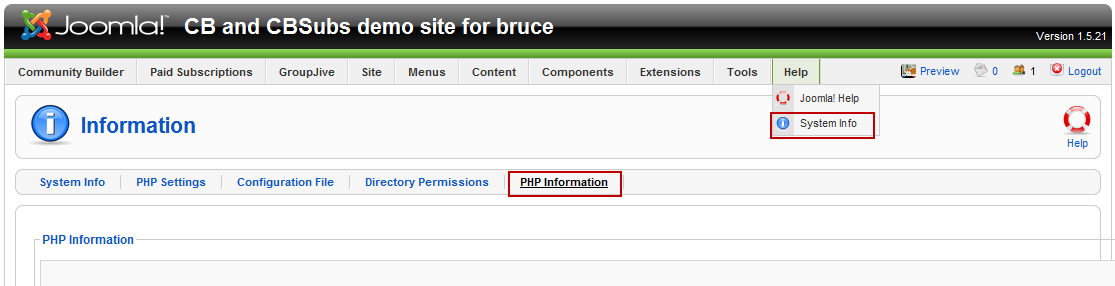
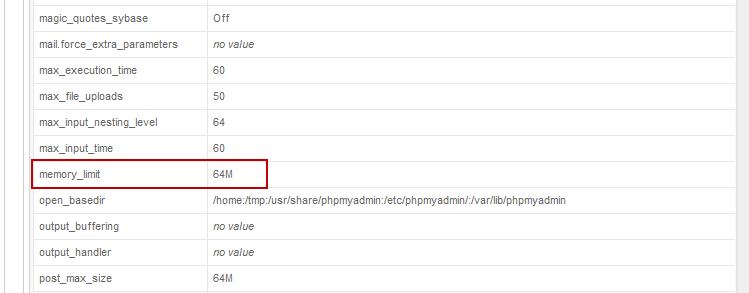
First thing you should check is your PHP Information tab of your Joomla System Info menu as illustrated in the following two figures:
phpmem-1

phpmem-2

From these two figures it looks like the PHP memory in this Joomla! website environment is set to 64M. But how can we verify this?

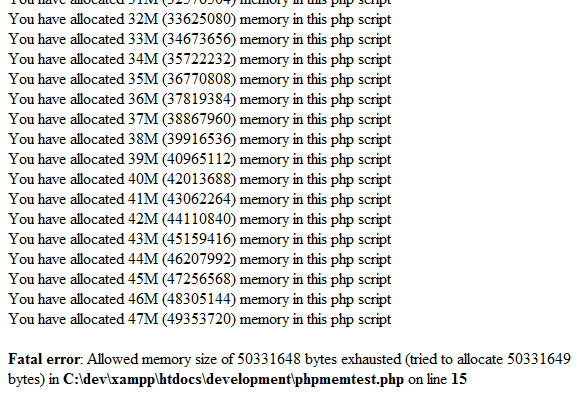
I have coded a simple php script to brute force test memory allocations. Just download the following script and upload it to your hosting environment. If you upload it to your html public folder then execute it by accessing the URL http://www.yourdomain.com/phpmemtest.php — you should see some output like the following figure.
phpmemrun

So, according to this script, it looks like only 48M are available in this environment and something is prohibiting our script to reach the 64M allocation limit that the PHP Information tab is claiming. This information — the script and its output — should be sufficient to present to your host support team to document your claim.

Having responded to many forum requests on Joomlapolis regarding exhausted memory we have created a FAQ article describing basic steps to debug such situations. This FAQ article can be read here. Notice how the community has responded and contributed the Apache setting.

Hopefully, this article will help those confronted with memory issues.

Read 45162 times

Download attachments:

Tagged under Did you know...?
Nicholas G. Antimisiaris

Nicholas G. Antimisiaris

Nick, an Electrical Engineer and Computer Science veteran with extensive experience in the Telecommunications / Software industry in US and Greece, has been involved with opensource projects since 2002 and is loving it. He is a member of the Community Builder team on Joomlapolis as is known as nant in the Joomla universe.

Leave a comment

Make sure you enter the (*) required information where indicated.

[b] [i] [u] [s] [url] [quote] [code] [img]   

Comments (18)

  • avatar
    • 0
    • 0
    Nicholas K. Dionysopoulos

    Nick, thank you for sharing this important information. Many people are oblivious to PHP's memory limitations or the sheer fact that plugins contribute to memory usage. One tip we should share with the magazine readers is that the first approach to working around the out of memory errors is to disable each and every plugin they no longer use. Doing support of Akeeba Backup forums I bumped into many cases where the user had simply installed every plugin he could get his hand on, never used it and assumed it's using no resources. Disabling the whole bunch of said plugins reduced their memory consumption and made their sites faster. Of course, if this doesn't work, increasing the memory limit is a no-brainer :)

  • avatar
    • 0
    • 0
    Nicholas G. Antimisiaris

    @ NicholasD: how true - people tend to download and install anything they can get their hands on. Then they leave these - mostly unused - items to eat up their memory and compromise security (because they never follow upgrades for things they don't use).

    We also use the "please unpublish plugins one-by-one" method to help people debug what's really happening on their websites.

  • avatar
    • 1
    • 0
    Jurian

    Thank you Nicholas (both of you) for your wonderfull articles! Keep up the good work!

  • avatar
    • 0
    • 0
    SEO Cape Town

    Nice informtation, thank you...I suspect this could be why I keep getting that annoying memory error...the memory limit is set to 32M!

  • avatar
    • 0
    • 0
    Popcorn

    Very useful information, I had similar problems lately!Thank you!

  • avatar
    • 0
    • 0
    Alex Dobrin

    Excellent article. Thank you for publishing it.
    I have just two small observations.
    If the displaying of error messages is deactivated ( as it should be on a production server ) that error message will not be visible and the script will stop at the maximum memory php can use.
    And the test is stopping at 100MB. On servers with a bigger limitation you need to modify the php code. But I guess this is rarely the case. :)

  • avatar
    • 0
    • 0
    Nicholas G. Antimisiaris

    enter your message here...

    Alex Dobrin wrote:
    Excellent article. Thank you for publishing it.
    I have just two small observations.
    If the displaying of error messages is deactivated ( as it should be on a production server ) that error message will not be visible and the script will stop at the maximum memory php can use.
    And the test is stopping at 100MB. On servers with a bigger limitation you need to modify the php code. But I guess this is rarely the case. :)

    That's correct - that is why the script displays intermediate progress messages. The error message will surely appear in server logs - which should be monitored daily on production sites.

  • avatar
    • 0
    • 0
    Greg Owens

    Excellent script! THANK YOU !

    For all the Newbies trying to run this, make sure you rename the /phpmemtest.php.txt to /phpmemtest.php after you upload it to your server. Also, IF your hosting provider upgrades a server or you are in a shared or reseller hosting environment, this is good to run after your host provider makes an upgrade to make sure you have the memory that you need.

  • avatar
    • 0
    • 0
    WebTechMom

    Thank you for Sharing :)

  • avatar
    • 0
    • 0
    Wolfgang

    This shows you the memory per script
    not the total for all your running scripts

  • avatar
    • 0
    • 0
    Nicholas G. Antimisiaris

    enter your message here...

    Wolfgang wrote:
    This shows you the memory per script
    not the total for all your running scripts

    The test shows you the memory this script can consume on your website. If you make sure that its the only script running at the time it will report the maximum available memory all your php scripts can consume.

    It is not a debug tool for your running scripts.

  • avatar
    • 0
    • 0
    Tyler Jordan

    Thanks for this bit of code, it turned out my webhost was limiting me to 60MB, 20M of which was being used by the php interpreter, leaving me with only 40M - even though my global php.ini was set at 200M - it made no difference. After complaining, they moved me to a newer server with more memory. I suspect this is common, and many are not aware that there hosts are scrimping.

  • avatar
    • 0
    • 0
    Karen

    Hi,

    Thank you for taking time to write this detailed post. And thank you for the download, found out mine was really 64M.

    I’m a newbie and have been on this issue for more than 2 days already. I was creating multiple wordpress autoblog sites which always run cron scripts . This was my message.

    Fatal error: Out of memory (allocated 66846720) (tried to allocate 35 bytes) in /home/maxlife/public_html/healthydinnerrecipesreview.com/wp-includes/meta.php on line 311

    Tried the php.ini edit from 64 to 128M, and deleted unused plugins. Unfortunately, both didn’t work.

    Then tried .htaccess route but I always get an internal server error.

    Just wanted to run this by you guys to see if I did it correctly. This is how my htaccess looked like after the edit:

    # BEGIN WordPress
    RewriteEngine On
    RewriteBase /
    RewriteRule ^index.php$ – [L]

    # uploaded files
    RewriteRule ^files/(.+) wp-includes/ms-files.php?file=$1 [L]

    RewriteCond %{REQUEST_FILENAME} -f [OR]
    RewriteCond %{REQUEST_FILENAME} -d
    RewriteRule ^ – [L]
    RewriteRule . index.php [L]
    php_value memory_limit 128M
    # END WordPress

    So is this correct? How come I always get an internal server error when I edit the htacces file?

    Other actions taken:

    edited wp-config.php, wp-settings.php

    Don’t really understand PHP codes so would really appreciate any guidance. Thanks a lot in advance.

  • avatar
    • 0
    • 0
    Karen

    OK, my problem just got solved!!!

    Got it from this [http://wordpress.org/support/topic/fatal-error-out-of-memory-messages? replies=24#post-1929111=]post [/http://wordpress.org/support/topic/fatal-error-out-of-memory-messages? replies=24#post-1929111] , thought I'd share it with you guys :

    
THIS TO BE ENTERED IN THE WP-CONFIG FILE WHICH IS IN THE ROOT OF THE WORDPRESS SETUP:
    ENTER AFTER:
define('ABSPATH', dirname(__FILE__).'/');
    THE FOLLOWING:

    define('WP_MEMORY_LIMIT', '64M');

    I ALSO CREATED A PHP.INI WHICH I UPLOADED TO THE PLUGIN FOLDER IN WP-CONTENT:

    memory_limit = 128M; Maximum amount of memory a script may consume (64MB)
max_execution_time = 45;
upload_max_filesize = 10M;
post_max_size = 20M;


    Hope this helps!

  • avatar
    • 2
    • 0
    john

    hello,

    seems like the download link is dead now?

  • avatar
    • 0
    • 0
    Ryan

    I get this error when I have Joomla's cache enabled in Global Config:

    Code:

    Fatal error: Allowed memory size of 146800640 bytes exhausted (tried to allocate 15656475 bytes) in /libraries/joomla/cache/storage/file.php on line 142

    The memory_limit in the PHP.ini file is set to 90M, which from what I've read, is quite a lot.

    I don't know how to troubleshoot this. Raising the memory_limit seems like a band aid. Can anyone provide some advice on how to fix / troubleshoot this.

    Joomla 2.5.1
    PHP 5.3.5

  • avatar
    • 0
    • 0
    Will

    As John noted, the download link is not working. Can we get a safe copy of this file elsewhere, anyone know?

  • avatar
    • 1
    • 0
    Nicholas G. Antimisiaris
    john wrote:
    hello,

    seems like the download link is dead now?

    I have asked the magazine team to look into this.

    In the meantime the file is also available on Joomlapolis (registration needed):
    https://www.joomlapolis.com/downloads/cat_view/77-free-member-download-area