 Community Magazine

This is the second part of my secure website which is translated from the Hebrew guide. The first part was more basic and targeted beginners. This part is more advanced, with details and explanations.
Servers
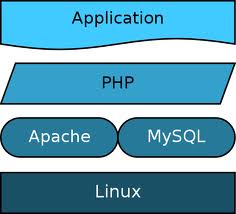 Most web servers in the world run on the Linux operating system. The reason is that this system is secure and easy to maintain for IT managers. Most of the exploits I’ve encountered were not because of Linux, and the exploit source was in the layers above the server platform. If your hosting provider takes care and maintains all server layers – Apache, MySQL and PHP (see demonstration image), and updates them as necessary, most of the security risks will occur in the application layer, Joomla in this case, so this is where you will need to be most careful.
File permissions
One of the first things that you should look at is file permissions if you are going from a development environment to production. On a straight Joomla install you won't need to do this. For every file and directory in Linux there are three flags – read (r), write (w) and execute (x). In addition, there are three related groups – user (u), group (g) and others (s). Each group contains the 3 flags. Each file has permissions that can be converted to numbers, but I won't go into detail about those flags, groups and numbers. I’m sure that you can google it for full documentation. What is important in those flags is the "write" flag of other group which allow users to add files to the file system. An example of adding files to the file system is adding images and other files to the content. Joomla has a few directories that need write permissions for those files, including the cache directory (used for caching pages), and the tmp directory (used for temporary allocated files during extension installation, for example). Therefore, we should allow those directories to be writable, but only those directories. All other directories and files should not be writable.
The permission for files should be set to 644 (meaning only the "user" group has write permission and not the "group" nor "others"):
find /home/xxx/domains/xxxxxxx.com/public -type f -exec chmod 644 {} \;
Directories require a permission of 755 (meaning only the "user" group has write and execute permissions, not the "group" or "others"):
find /home/xxx/domains/xxxxxxx.com/public -type d -exec chmod 755 {} \;
A few further notes:
- If you are curious about the numbers and how they convert from flags and groups to numbers read this guide (it’s behind this guide scope).
- The command can be run via ftp, ssh or a cpanel interface.
- Pay attention that the directory /home/xxx/domains/xxxxxxx.com/public is replaced with the path of your Joomla installation on your server.
Making directories writable
As I mentioned before, sometimes we need some directories to be writable. The directories I recommend to be writable are: cache, tmp and images. You could do this with the following command:
cd /home/xxxxxx/domains/xxxxxxx.com/public_html && chmod -R o+w images cache tmp
Now, what if someone hijacks your Joomla site and uploads a script file (PHP is a script language)? One can install a script that can do anything on the server including destroy our beautiful website. Of course, Joomla blocks uploading scripts by default, but what if some extension didn’t block it?
The answer is divided into two options. First, if you don’t need to upload images for content, don’t use the cache or install any extensions – do not make any directories writable!
In case you need some of the features I mentioned, or any other feature that requires making directories writable, you must disable the ability to run scripts for these directories. To do that, you need to use the next simple trick – add an .htaccess (start with dot!) file for each directory, and it should contain these lines:
# secure directory by disabling script execution
Options -ExecCGI
AddHandler cgi-script .php .pl .py .jsp .asp .htm .shtml .sh .cgi
An htaccess directive precedes any Joomla activity because the file derives from Apache, calling up htaccess before any PHP.
MySQL Database
The recommendation is to avoid using the default prefix jos_ for MySQL tables. Version 2.5 randomizes the prefix. If you’ve already installed Joomla with this prefix, just use script or guide to convert the tables prefix to another one, and don’t forget to update your configuration right after it.
In addition, it is advisable that the user running the MySQL service only use the following specific permissions (SELECT, UPDATE, DELETE, INSERT, CREATE). In any case – DO NOT USE the root user for MySQL. This is very dangerous!
Advanced: PHP
The next options are for advanced users with access to the PHP configuration file called php.ini. If you are not familiar with this, leave it to your host provider.
Blocking risky function
PHP is the most common programming language for web based applications. It is easy to start developing with PHP, which is one if its big advantages, but it can be risky. There are a few functions that can give access in unneeded places. You can easily block dangerous functions with the disable_functions argument:
disable_functions = show_source, system, shell_exec, passthru, exec, phpinfo, popen, proc_open, eval
These functions allow users to run functions on the server such as sending data, running commands from the server, receiving info about the server, etc., but be careful. They are useful in a development environment, but in production they are not recommended at all.
PHP access directives
PHP can access any place in the web server, unless configured otherwise. This is dangerous, because if a hacker gets access to the server he can get access to any place. To reduce this risk, let’s define in PHP what he can access:
open_basedir =/home/xxxxxx/domains/xxxxxxx.com/:/tmp
The tmp directory should be accessible (this is not the Joomla tmp directory), because the PHP uploads are done first to this directory, before moving on to Joomla.
Advanced: htaccess
As mentioned before, the htaccess file can filter data before going into the Joomla application, and that saves server usage. This is all good, but you may ask why this section is for advanced users, if it’s configure and forget. The answer is that htaccess can filter information required from necessary requests, and sometimes beginners with limited experience start playing with the file and it breaks things. In the worst case they can remove Joomla rewrite directives, and then the htaccess will be corrupt and basic operations in Joomla will stop working (like SEF links).
My recommendation is to add a specific section to the htaccess file for each new directive, and keep track of the directives you added. Save the original as an htaccess.txt file so you can revert back to a working version in case you lose track and things break.
You can find detailed and long htaccess files in the Joomla wiki and use specific sections from there.
Blocking direct access to the Joomla core
All Joomla application requests go through one place - index.php (in version 1.5 there is also index2.php). Any other direct access can be considered a hacking attempt. No extension (most of them) use direct access to any file except index.php, going through the Joomla platform which goes through this gate. Therefore, you can block direct access to most of the files (ini, xml & php) by adding the next section in your htaccess file:
#### @RS
# Deny access to php, xml and ini files
# within components and plugins directories
RewriteCond %{REQUEST_FILENAME} -f
RewriteCond %{REQUEST_URI} \.php|\.ini|\.xml [NC]
RewriteCond %{REQUEST_URI} \/components\/ [OR]
RewriteCond %{REQUEST_URI} ^\/includes\/|^\/administrator\/includes\/ [OR]
RewriteCond %{REQUEST_URI} \/language\/ [OR]
RewriteCond %{REQUEST_URI} \/libraries\/ [OR]
RewriteCond %{REQUEST_URI} \/modules\/ [OR]
RewriteCond %{REQUEST_URI} \/plugins\/ [OR]
RewriteCond %{REQUEST_URI} \/templates\/ [OR]
RewriteCond %{REQUEST_URI} \/xmlrpc\/
RewriteRule ^(.*)$ index.php [R=404,L]
#### @RS
The @RS marks the beginning and end of the section.
Blocking MySQL injection hacks
SQL injection doesn’t work in Joomla because most developers use the Joomla core SQL functions. But, again, there are few lazy extension developers who don't do this. Therefore, you can block those attempts with the next section:
#### @RS
# Prevent most common SQL-Injections
RewriteCond %{query_string} concat.*\( [NC,OR]
RewriteCond %{query_string} union.*select.*\( [NC,OR]
RewriteCond %{query_string} union.*all.*select [NC]
RewriteRule ^(.*)$ index.php [F,L]
#### @RS
Blocking hijack tools
Anyone who visits your website is called a user-agent. For regular visitors, this includes browser identification (Firefox, Explorer, Chrome). For search engine bots there is a special identification, and for hijack tools there are unique identifications. Therefore we can block them too:
#### @RS
# Block most common hacking tools
SetEnvIf user-agent "Indy Library" stayout=1
SetEnvIf user-agent "libwww-perl" stayout=1
SetEnvIf user-agent "Wget" stayout=1
deny from env=stayout
#### @RS
Advanced: Change configuration.php location
Since version 1.6, you can change the location of the main configuration file: configuration.php. There are a few reasons for making this change. First, a lot of hackers know that you’re running Joomla and try to hack this well-known file. In addition, the file lives in the same place (it is static), and can be accessed from the web because it’s in the public folder. The risk was raised by people making that file writeable in order to be able to update the global configuration in the admin panel.
The question that should be asked is how can we change the location of the file, preferrably out of the public folder, and still let Joomla continue work correctly?
You can override the default location of the configuration file, but not just the configuration path, you can change mulitple paths. For this guide we will change only configuration (backup first!):
- Copy the file public_html/includes/defines.php to public_html and public_html/administrator/includes/defines.php to public_html/administrator/defines.php.
- Edit each new defines.php in public_html and public_html/administrator, and add the next two lines:
define('_JDEFINES', 1);
define('JPATH_BASE', dirname(__FILE__));
Under:
defined('_JEXEC') or die; - The next step would be updating the default location of the configuration in the new files. For example let’s put the configuration out of the public_html scope (one level above it). For that let’s change the next line from:
define('JPATH_CONFIGURATION', JPATH_ROOT);
to:
define('JPATH_CONFIGURATION', JPATH_ROOT .DS.'..'); - Again, you make this change in both new defines.php files.
- Don’t forget to move the configuration.php file to the new location!
Summary and dessert
I hope you learned more about security from this second guide which was aimed to be more advanced.
Keep in mind that security is an ongoing process and one should always take care to keep it as secure as you would your home or business.
Comments